
Using the SolidWorks API to Import 2D Data
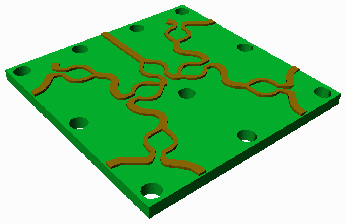
Most EDA data is essentially 2 1/2 D - it consists of 2d entities such as polygons and circles and traces that have a Z height and thickness. Artwork would like to be able to bring this kind of data into SolidWorks in an intelligent and useful fashion so that engineers can incorporate the EDA data as part of their mechanical designs and so that they perform various analyses on the EDA data from within the SolidWorks framework.
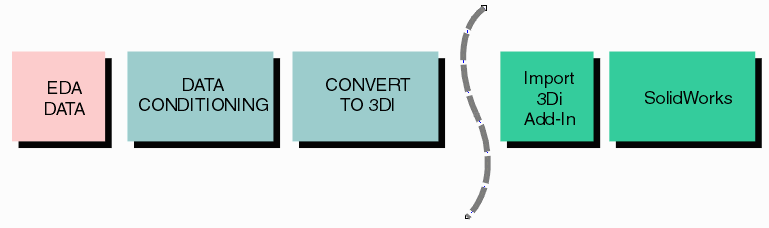
What Basic Elements from EDA
The basic elements from the EDA world consist of:
conductor traces - thin traces of conductor used to move signals or power from one point to another.
conductor pads - traces usually terminate on a conductive pad as do components.
conductor planes - large regions of conductor with many holes in them used to distribute power or ground
substrates - non conductors such as silicon, fiberglass, plastic that support the conductors
vias - holes drilled between substrate layers to connect them - usually centered in a pad.
wires - very tiny (0.001 inch diameter) gold wires used to electrically connect an integrated circuit to its package or substrate)
spheres - normally tiny solder balls used to connect a package to a PCB. often the sphere is "squashed" to model it after solder reflow.
These elements are sufficient to represent integrated circuits, packages and printed circuit boards. There are other properties such as nets, ports, pin labels and material characteristics that are part of the EDA database but these can be attached as attributes to the basic geometric elements.
Conversion and Data Pre Conditioning for SolidWorks
Data from a variety of EDA formats must first be read and conditioned prior to attempting to bring it into SolidWorks. This is all done using various C++ modules that Artwork has developed over the last 20 years.
The data format we use to "hold" all of these geometric structures is called 3Di.
Traces and Pads
PCB circuit traces and pads must be taken together as they overlap. Solidworks does not support any 2D trace with width so the trace must be converted into a shape and then unionized with the pads that it intersects as shown below:
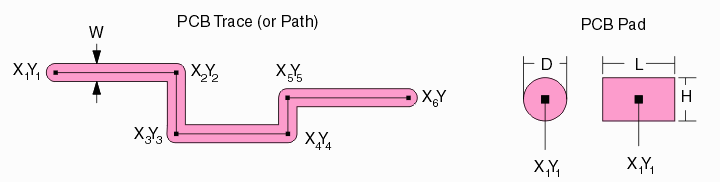
Typical PCB trace (round end) and round/rectangular pads

Traces on a PCB almost always terminate on a pad at each end.

We condition these for SolidWorks by unionizing the overlap.
Arcs or No Arcs in the Boundary Description?
A very large number of traces intersect with round pads. When we do a boolean between the trace and the pad our tools normally first convert any curves into a series of short segments. However we also can "recover" the original curves after the boolean is complete.
The question when passing such a shape to SolidWorks for extrusion in 3D is whether it is preferable to pass the boundary with many short straight segments that approximate the curves or whether to use a boundary description that includes the curves.
>>>> Circuit Trace 3Di Data and SolidWorks API
Conductor Shapes and Planes
Most high speed PCBs include planar layers of conductors that are "perforated" by holes where the vias pass through them. These can have quite a few holes - easily several hundred.
An illustration (low complexity) is shown below:
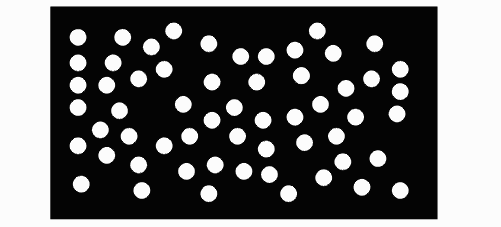
PCB power/ground plane. Sometimes the plane is "split" or has some signal traced embedded into it.
>>>> Region with Hole 3Di Data and SolidWorks API
Vias
Vias are generated when a substrate (or stack of substrates) is drilled and the subsequent hole is plated with copper or other metal. These can be modeled as hollow or solid cylinders 3D. In the 2D CAD description, a via is normally defined by its starting and stopping layer and its diameter.
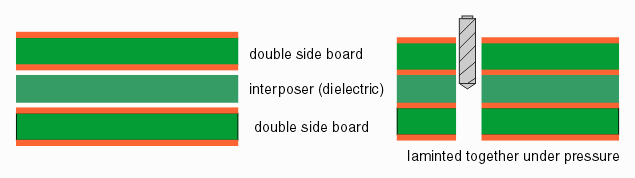
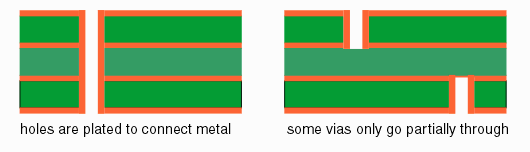
Sometimes to reduce the amount or complexity of the data, a PCB via is modeled as a extruded polygon with 6-8 sides instead of an extruded circle.
For integrated circuits vias are formed lithographically and are generally square or sometimes rectangular. They do not pass through more than one insulator layer.
However a new type of via called TSV is now starting to be used for integrated circuits which passes through all the metal layers and through to the bottom of the silicon. This will be important to model in the near future.
Substrates
Substrates are usually very simple - in many cases they are just a rectangle extruded in Z. However for PCBs they normally have a large number of vias running through them and there are a number of rectangles - each representing a dielectric layer between conductor layers.
Wires
Wires are very thin conductors made from gold or aluminum. Wire diameters vary in range from about 0.001 inch in diameter for most low power IC's to 0.010 inch (rectangular crossection) for power devices.
Some EDA systems only represent the wire in 2D i.e. from X1,Y1 to X2,Y2 and assign it a "layer." However as IC package design has advanced the need for more accurate 3D models of wires has risen and we now have 3D models for wires that decompose to a set of a set of X,Y,Z coordinates together with a wire diameter.

Example of a MCM with multiple stacked die and wires.
Depending on the application, users will vary the complexity (i.e. the number of points) in their 3D wire models.
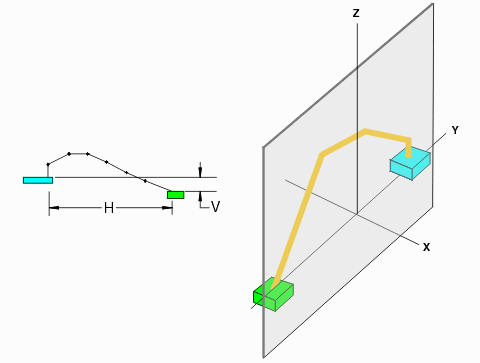
>>>> Wire 3Di Data and SolidWorks API
Solder Balls
Solder balls are used for flip chip packages. The balls are attached to an array of round pads on the top of the integrated circuit and then the circuit is "flipped" so that the balls then touch the package surface. The combination is heated until the solder melts permanently attaching the chip to its package.
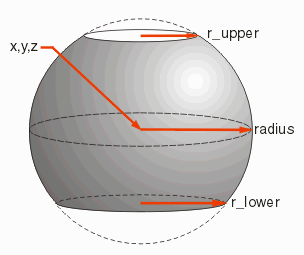
Our current parameters for solder balls are to define 3 radii - one along the equator, one above the equator and one below the equator. This represents what the ball will look like after it has been melted. Generally it is not symmetric because the pad on the top and the pad on the bottom are not the same size.
An Assembly of Elements
Below is a snap shot of a 3D model of a multi-layer integrated circuit package. This is a high performance package in that it combines layers of high density interconnect (HDI) with a more conventional FR4 section in the center. You can see a conductor trace on the top of the package which then moves through multiple vias to the bottom and where a solder ball has been placed.
Of course, we are only showing two of approximately 1000 such connections for the entire package.
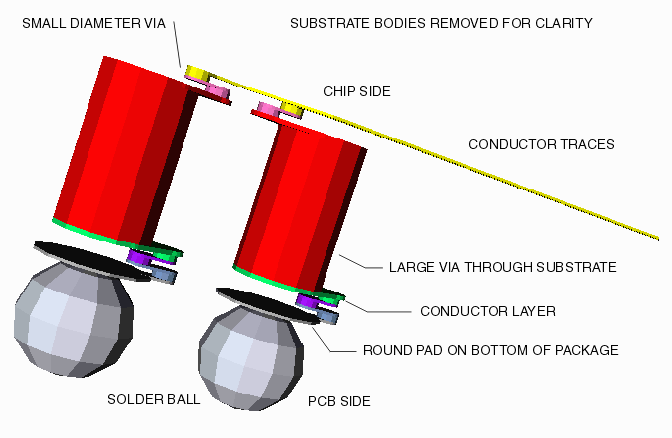
To give you an idea of scale, the diameter of the solder balls is approximately 0.3 mm and the Z thicknesses of the other elements has been scaled by a factor of about 10 for clarity.