
Many OEM's do not need the level of control that directly calling gbrplt.dll offers because using it requires a lot of expertise. If your application uses TIFF or BMP output you can use the GBR2TIFF.EXE application (or library) that we provide. The coding required to move the pixel data from memory to a standard format on disk is done by GBR2TIFF.
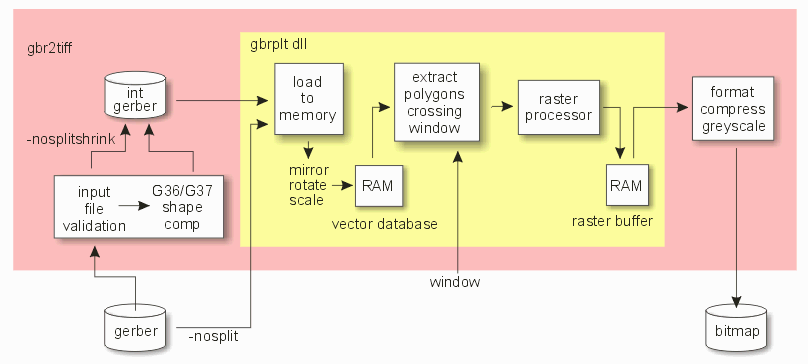
Artwork provides gbr2tiff.exe both as a binary executable (for those who want to immediately start producing bitmaps) and as source code (Microsoft Visual Studio) for programmers who would like to see a working example of how to use gbrplt.dll.
If as a programmer you would like the functionality of gbr2tiff.exe but in library form, we also provide gbr2tiff.dll along with a sample calling program.
gbr2tiff64.exe

 gbrfile(s)

     [-xf xformfile]

        [ -tiff:outputfile | -bmp:outputfile | -ps2:outputfile | -bitmap:outputfile  ]

           [other_options]


 where

 gbr2tiff64                    the gbr2tiff program

 gbrfile                       the Gerber file to be ripped


 -xf:xformfile                 optional; name of an ascii file contain
                               transform parameters for mirroring, rotation
                               and scaling.


The following output types are available (outtype:filename) Select one:

 -tiff:outputfile              output file in 1 bit tiff; uncompressed

 -pack:outputfile              output file is 1 bit tiff; packbits compression.

 -bmp:outputfile               output in Windows BMP (monochrome)

 -bitmap:outputfile            output is raw bitmap (uncompressed)

 -bigtiff                      Turn on Big TIFF header which allows output files over 4 GB.
                               Must be used along with -tiff or -pack command line options.


[other options]                if these are used as command line arguments then they
                               supersede the same directive in the xform file.

-ram:R                         use R as the raster buffer size (Mb) default=32M

-units:                        {inch | mm} specifies xformfile units
                               with the exception of Resolution (DPI)
                               which is always in inches
                               (aliases -inch, -mm)

-dpi:DPI                       dots per inch (fractions OK)

or

-dpm:DPM                       dots per millimeter (fractions OK)

or

-pixelsize:P                   diameter of pixel (units will be inch or
                               mm based on -units value)

-dpx:[DPX]                     indicates the integral reduction of DPI in X
-dpy:[DPY]                     indicates the integral reduction of DPI in Y

-inverse                       output image polarity is reversed (bits are flipped)

-reverse                       remaps the BMP color table to reverse darkest/lightest


-super:[ 2 | 4 | 8 | 16 ]      super sample output

-super:18                      monochrome TIFF or BMP but using 8 bits per pixel.

-super:28                      super sample output 2x2 and each byte corresponds to one
                               pixel (-tiff). -super:2, each byte contains 4 pixels.

-super:48                      super sample output 4x4 and each byte corresponds to one
                               pixel (-tiff). -super:4, each byte contains 2 pixels.


-rle                           BMP for GREYSCALE output with RLE8 compression


-bmp4gb                       output is Windows BMP to avoid 4GB limit (avoids the check
                               for file and image sizes and writes "0" into the BMP header
                               fields that hold the image and file size.


-color[:2 | 16 | 256]          set BMP output to 2, 16, or
                               256 greyscale modes (BMP only)


-greylevel:L,H,D              specify min grey value to be L, max value to be H,
                               and that of drill files to be D (only valid for -super:16)

-add {GerberDrillFile}         add GerberDrillFile to base image (to be used in
                               conjunction with -super:16 and -greylevels)


-asizeup:X                     size aperture info up by X units

-rotate:A                      rotate image A degrees (alias -rA). Allowed values are 90 and 180.
                               (when using -imagesize -rotate:auto is valid)

-scale:X[,Y][@P,Q]             scale data by X and Y in the x
                               and y directions respectively
                               (optionally about the point P,Q)
                               (default: X = Y) (alias -sX)

-shift:X,Y                     translate data by X and Y
                               (incompatible with -wplot)

-xmirror:X                     reflect data about the line x = X
                               (-wplot implies simple X mirror, i.e. -mirror:x)

-ymirror:Y                     reflect data about the line y = Y
                               (-wplot implies simple Y mirror, i.e. -mirror:y)

-drawadj:A                     same as above except the amount of adjustment
                               is user specified. (Units based on value in
                               transform file, or delineated on command line)

-step:Nx,Ny,Dx,Dy              arrays data in an Nx by Ny rectangular
                               array with spacing of Dx and Dy

-wplot x0,y0 x1,y1             rasterize data in the window from x0,y0(LL)
                               to x1,y1(UR)

or

-wplot @filename               where filename is an ascii text file that
                               contains a number lines and each line has
                               the window's corner coordinates:
                               LLx,LLy URx,URy Requires multi-window
                               license.

-pause                         don't run right away, wait for user intervention.
                               requires -status

-status                        run visibly.

-logcalls                      record the calls to setupFunc to plot.log
                               for debugging purposes.


-nopad                         do not pad tiff output to the nearest byte.

-noplot                        do not create any output, rip data only;
                               for debugging purposes.

-scanonly                      do not create any output, scan
                               input GERBER file only


-aw                            auto window data (overrides -wplot parameters).

-aw:L,R,T,B                    auto window data with margins where L, R, T and B
                               are the margins on the left, right, bottom, and
                               top (don't use with -margin).


-margin:X                      provide a border of X units (used in conjunction
                               with -wplot or -aw).

-margin:L,R,B,T                provide a border where each side (L=left, R=Right,
                               B=bottom and T=top) is independently set by
                               the user.


-threshold:N,N,N               Associated with super sampling (-super:2, -super:4,
                               -super:8, -super:16).
                               The output is always 2 bits per sample.


Engine Arguments               arguments that follow -engargs  do not affect
                               GBR2TIFF but are passed to the gbrplt.dll
                               argument list.

-engargs                       Arguments passed directly to the gbrplt64.dll

  -novalidate                  turns off input file validation.

  -compensate                  compensate G36/G37 data by 1/2 pixel (implies validation, same as -contours)
                               if -compensate is used, it forces validation also.

  -thrnum:N                    Use multiple threads for faster rasterization.
                               Requires additional key codes.

  -msgcbs                      suppress popups and make use of
                               message callbacks instead

  -keep                        do not delete temporary files

  -logmem                      report memory statistics to plot.log

  -loglibs                     log library usage to plot.log

  -drawadj[:V]	               "uncompensate" trace data by Value when compensating contour data

  -slant_adjust                Turn ON corrections for round ended linear draws when the slope of a trace was between -20 and 20 degrees.

  Split274x Arguments          arguments that come between -bgn_split_args and -end_split_args do not affect
                               GBR2TIFF but are passed to the split274x64.dll (these must be placed after -engargs on the command line)

  -bgn_split_args              Start of arguments to be passed to split274x64.dll

    -chord_error:value         Specifies arc chord error for arc data representation.

    -arcres:value              Specifies arc resolution for arc data representation.

    -sr_span_tol:value[unit]   Specifies resolution to use when handling SR. This option tells the software to perform a test for the
	                       displacement of the extremal drawables in an SR block from their "ideal" position. This option is off by default. Takes unit specifier (For example -sr_span_tol:1.01um)

    -fmt:value                 Specifies different format from input Gerber file to increase/decrease resolution of data during the conversion process (For example -fmt:26)

  -end_split_args              End of arguments to be passed to split274x64.dll
Using gbr2tiff.exe to convert our sample Gerber file to compressed TIFF format at 1000DPI. The aw command line option is used to tell the software to calculate the extents automatically.
C:\WCAD\GBRIP\gbr2tiff.exe icsxseed.gbr -274x -inch -aw -pack:output.tif -dpi:1000
Using gbr2tiff.exe to convert a window (lower left at 0,0 and 5,6 as top right) from a Gerber file to compressed TIFF format at 1000DPI.
C:\WCAD\GBRIP\gbr2tiff.exe icsxseed.gbr -274x -inch -wplot 0,0 5,6 -pack:output.tif -dpi:1000
Using gbr2tiff.exe to convert multiple Gerber files in one command.
In this case, we will create a text file with the list of Gerber files we want to rasterize. One file name per line.
test_0.gbr
test_1.gbr
test_2.gbr
test_3.gbr
test_4.gbr
test_5.gbr
Then we create a batch file that will execute the gbr2tiff, reading the gerber file names from the text file.
C:\WCAD\GBRIP\gbr2tiff.exe @layers.txt -274x -mm -bmp:0.bmp -dpi:45000 -inverse
In this example, the program will create 6 different BMP output files, at 45000DPI and it will also reverse each of the BMP files.
Using gbr2tiff.exe to extract and rasterize 1000 small windows from the gerber file called layer1.gbr. We have prepared a text file, 1000w.txt, with 1000 lines - each line contains the corners of a small window.
3.243350,14.717415,3.262250,14.731615
2.124791,16.974720,2.143691,16.988920
9.349831,15.389520,9.368731,15.403720
.
.
Then we create a batch file that will execute the gbr2tiff, reading the windows from the text file which is located in a subdirectory called input_list.
C:\WCAD\GBRIP\gbr2tiff.exe
            layer1.gbr
                -274x
                    -inch
                        "-bmp:%CD%\output\win.bmp"
                                            -dpi:54000
                                                   -wplot "@%CD%\input_list\1000w.txt"
When the program is complete there will be 1000 .bmp files in the subdirectory named output.