
|
|
|
StepVu reads a stepper control file and converts the instructions into a GDSII layout display showing where the various reticle shots are placed on the wafer. A mask engineer who is responsible for creating the stepping recipe can use this program to quickly verify that his window selections and stepping instructions are correct. StepVu produces a GDSII file prior to display. |
This can be useful to package engineers who design whole wafer masks intended to add packaging metalization to the wafer as it provides them a completely accurate way to identify the die locations along with any target or fiducial locations. Wafer Map Viewer - StepVu also supports the industry standard SINF format for wafer maps. This data is also converted into GDSII and can be used as a basis for generating redistribution circuits. |
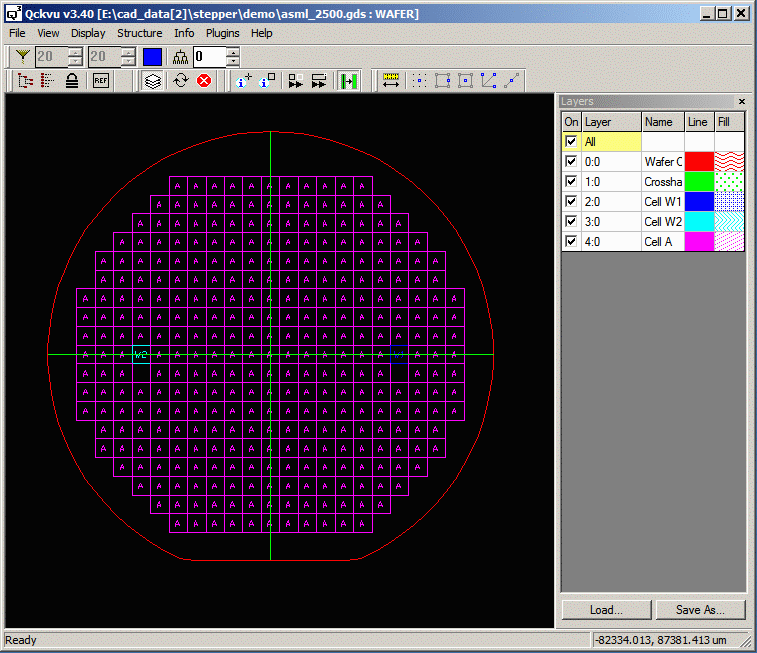
The StepVu program is implemented as a plug-in to Artwork's Qckvu3 GDSII viewer. |
Features
|
Supported Formats
ASML PAS5500 SINF demo [video] We would like to support steppers from Canon, Nikon, Ultratech and GCA and are interested in working with companies that can provide examples of control files for those brands of steppers. |
| Additional Info | Download | Revision History | Price |