
|
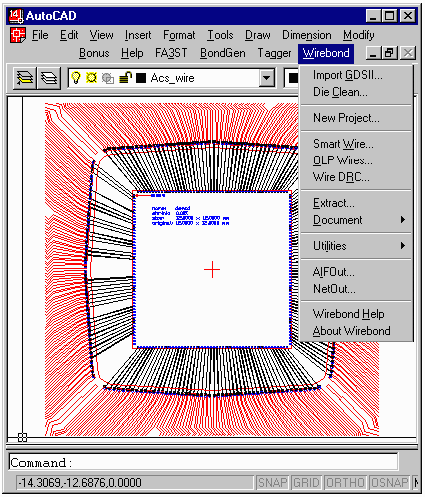
No IC package gets built without a bond wire drawing for the factory. Generating and checking this drawing is often a bottleneck in the package manufacturing process. Artwork has developed the Wirebond program to speed up and simplify the generation of bond wire documentation. Wirebond has been designed specifically to produce an AutoCAD drawing using as input the AutoCAD drawing of the package shell and die information. The die information can originate as GDSII stream, AutoCAD, an ascii table or spreadsheet. |
|
Database - not a PictureWhen you use Wirebond to create your bond documents you are actually creating an intelligent database inside of the AutoCAD drawing - not just a picture. This means that the netlist can be reverse extracted from the bondwire drawing, wires can be checked automatically and modifications are much faster and cleaner. |
Features
|
|
DownbondsWirebond can automatically place the downbonds to a paddle or ring area. Downbonds can be directly specified die pad by die pad or can be specified as a function of the die pad netname. Sorting Wires by TiersWirebond sorts out wires and segregates each “tier” onto its own AutoCAD layer. This is required for OLP compatibility. Wire DRCWirebond checks the spacing, length and angle of every wire against the design rules. Errors are flagged for review. |
Tutorials (FLASH) |
|||
| Preparing AIF/Connect List | Preparing the AIF file and the Connection List. Describes how to use Excel to prepare the AIF file that describes the die and the connect list which controls the bonding. |
||
| Extracting Pad Coords from GDSII | Shows how to import a GDSII file of the chip, extract the pad shapes, coordinates and net names to produce an AIF file ... |
||
| Wirebond - Part I | Describes how to select the die file, the package file and place the die. Describes how to import a connection list and wirebond the part. |
||
| Wirebond - Part II | Describes how to run the Wire DRC and how to generate a document package with annotation. |
||
| Wirebond - Part III | Describes how to label package pins with net names -- first by transfering the net from the die pad to the package (using Pad Transfer) and then using Bond Text to generate the desired labels. |
||
| MCM - Part I | Describes how to prepare the AIF files and the connection list for a two die MCM ... |
||
| MCM - Part II | Describes how to place two die, how to rotate and translate die position and how to use a connection list to do the wire bonding. |
||
| MCM - Part III Labeling Package Fingers with Netnames | Describes how to move net names from the die pad to the package fingers (using PAD Transfer) and then how to generate labels using Bond Text. This example uses an MCM with two die. |
||
| Die Pad Renumbering | Describes how to "correct" the numbering of die pads - on a small analog die where the placement of the pads "confused" Die Clean's numbering routine is fixed using DPNum. |
||
| Page | 1 | 2 | 3 | 4 | 5 | 6 | 7 | 8 | 9 | 10 | 11 | |
|
Download |
Price |
Datasheet (PDF) |
Rev. History |
Installation |
Artwork Home |
|