
Prior to downloading you should contact Artwork and request the following information:
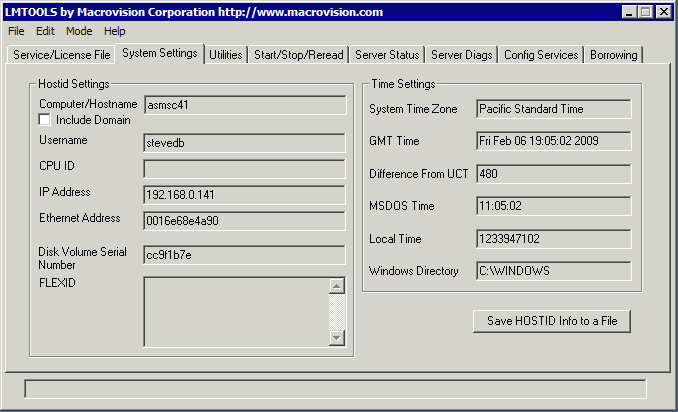
In order for us to generate license strings, you need to provide us your machine's ID. This is best done by downloading the FlexLM_Tools utility and running it on your machine. Use the System Settings tab and copy the Ethernet Address and Disk Volume Serial Number that it displays. See below:
Dear Hagai,


I would like to evaluate your ASM2600 program. Please send me the download credentials, the installation password and temporary
license key strings for my machine.


I got my ethernet physical address by using the lmtools
utility provided above.


ethernet address = 00560abE72


Reason for Evaluation

---------------------

I intend to use the program to convert GDSII files to our Electromask pattern generator.


Thanks much,


John Boy

International Harvesting and IC Design

10087 Champion Way Bldg 43

Topeka Kansas 09323

Tel (450) 132-2213  Fax (450) 132-2113
The ASM 2600/w software includes the PG2GDS/GDS2PG bi-directional translator, PGCAM viewer and the Qckvu3 viewer.
v7.01 8.1 MB
v3.72 7/28/2020 17 MB
PGSORT Version 1.38 6.59 MBytes
User manual for PGCAM (PDF)