QisMMRtcr Extension
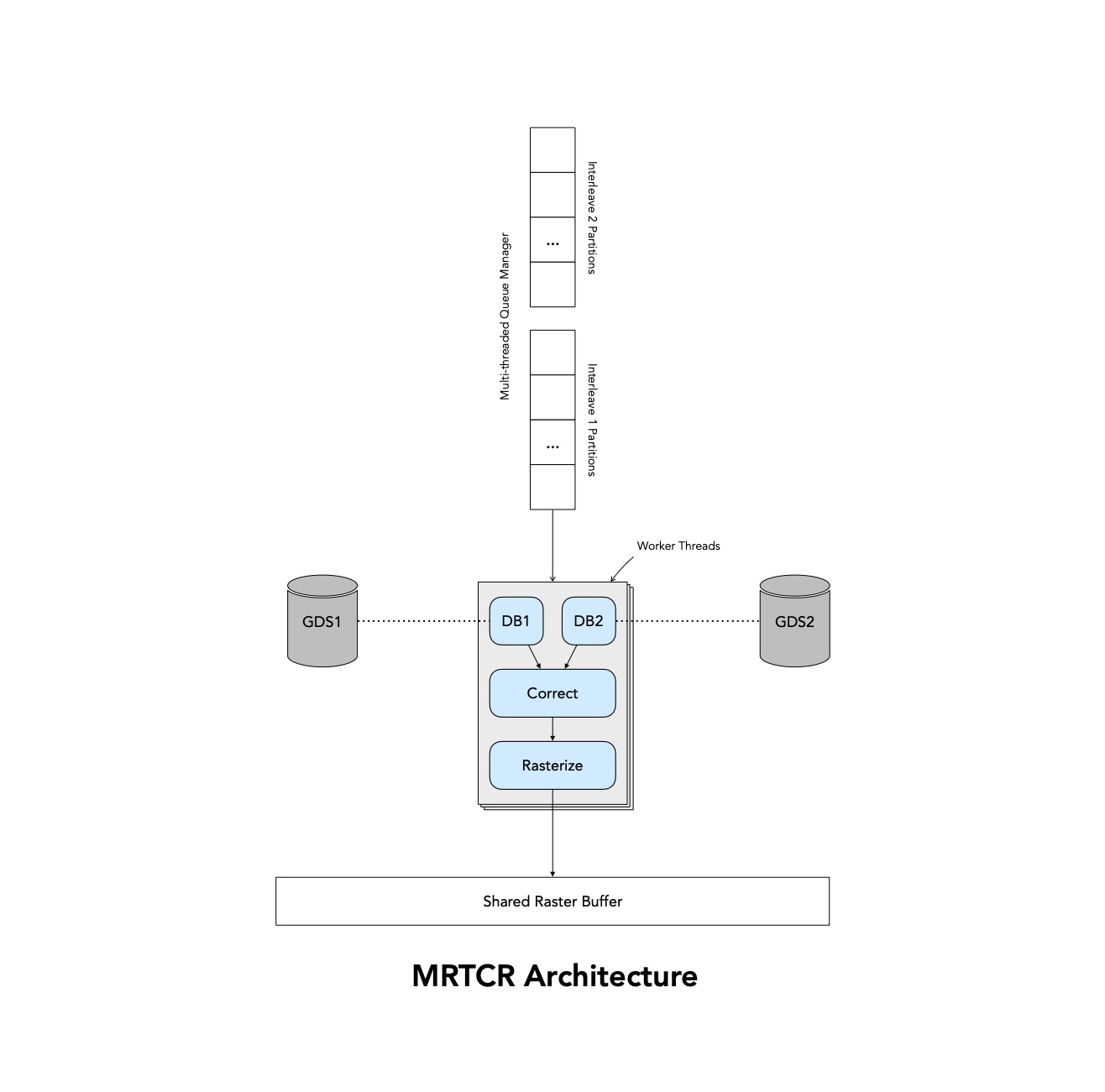
A QisMLib extension to -- generate a raster image from a view of two databases - one that represents passive data and another that represents active data with or without bi-linear corrections. The extension provides a convinience API and script commands to --
Fetch polygons from both the databases for a given ROI
Apply bi-linear corrections
Rasterize the corrected polygons to an image buffer
Use multi-threading for optimal performance
Can be used via the C++ API or the QisMLib scripting system
QisMMRtcr ExtensionNotes on PerformanceLong, Large or Complex boundariesSpecial handling of small rectangles (as PATHs)Presence of other kinds of PATHsSub-scan data partitioningQisMMRtcr C++ API (qismmrtcr.h)QisMMRtcrOptsEnum TypeVersion control (QisMMRtcrOpts)Set_optGet_optResetCopyQisMMRtcrImageVersion control (QisMMRtcrImage)Bytes_per_rowPx_per_rowPx_per_colBytes_totalBuffer_ptrGet_data_extentsGet_img_extentsClear_bufferQisMMRtcrVersion control (QisMMRtcr)Get_error_msgGet_error_tagGet_error_contextNew_optsDelete_optsNew_imageDelete_imageGenerate_mrtcr_scanQisMMRtcr Commandsmrtcr.scan_infomrtcr.new_optsmrtcr.delete_optsmrtcr.new_imagemrtcr.delete_imagemrtcr.clear_imagemrtcr.generate_scanQisMMRtcr Licensing (API)QisMMRtcr Licensing (Script)QisMMRtcr Version History qismmrtcr dll/so v1.0 04-2023
Notes on Performance
Long, Large or Complex boundaries
MRTCR will work best when the source GDSII files (passive or active) do not have the following --
Very long polygons (paths or boundaries) that cross an entire scan or even multiple scans
Very large polygons whose areas span an entire scan or even multiple scans
Complex polygons that have large number of vertices and/or complex contours
It is best to convert such polygons into smaller and simplified boundaries during a pre-processing step so that the GDSII files being used for MRTCR is more raster-friendly
A good measure of how big these boundaries should be is the approximate area processed by each MRTCR worker thread
Area / Thread = (Width of Scan / No. Threads) * Height of Scan
Special handling of small rectangles (as PATHs)

MRTCR has some optimizations for rectangles (in passive or active data) that are small enough that the distortion from within such a rectangle can be ignored. i.e It is sufficient to translate the entire rectangle based on the correction computed at a single vertex
Also, the rasterizer can avoid some unnecessary computations if it knows upfront that the polygon being fed is a rectangle
In order to trigger these optimizations, the source GDSII data (passive and/or active) should represent such rectangles as 2-point horizontal PATHs. The dx of the two vertices provides the rectangle-width and the PATH-width provides the rectangle-height
The
OPT_PATHS_PSSVandOPT_PATHS_ACTVcontrol parameters can be used to enable/disable this mode. By default, it is enabledIf this mode is enabled, ALL OTHER KINDS OF PATH DATA WILL BE IGNORED. Therefore, the source GDSII should not have any PATH data other than the ones that represent small rectangles
Presence of other kinds of PATHs
It's best to convert PATHs (that are not meant to represent small rectangles) to boundaries during a pre-processing step
If this is not possible, the special processing of small rectangles MUST BE DISABLED. i.e
OPT_PATHS_PSSVand/orOPT_PATHS_ACTVmust be set to 0 (by default, they are both 1/ON)
Sub-scan data partitioning

At the moment, MRTCR assumes that each image (scan) is a very long horizontal stripe (width >>> height)
Therefore, for purposes of multi-threading, it partitions the scan area only horizontally. This makes it unsuitable for use with applications where the scans are vertical (height >>> width) or even uniform rectangles (height ~= width)
Please contact Artwork if this assumption is contrary to your application needs
QisMMRtcr C++ API (qismmrtcr.h)
QisMMRtcrOpts
Represents an object to hold optional MRTCR control parameters
class QisMMRtcrOpts { ... };Enum Type
Represents various control parameter types
xxxxxxxxxxenum Type{ OPT_PSSV_CELL=1 /* Set the view cell for passive data * Default: The deepest top cell of the passive db is used * For Set_opt, **MUST** be followed by one `const char*` representing a valid cellname * For Get_opt, **MUST** be followed by one address of `const char*` to retrieve the cellname */ ,OPT_ACTV_CELL /* Set the view cell for active data * Default: The deepest top cell of the active db is used * For Set_opt, **MUST** be followed by one `const char*` representing a valid cellname * For Get_opt, **MUST** be followed by one address of `const char*` to retrieve the cellname */ ,OPT_PSSV_LAYERS /* Set a list of layers for passive data * Default: ALL layers of the passive db are used * For Set_opt, **MUST** be followed by one `const char*` representing a valid layer-string ("ALL" or a comma-separated list of layers) * For Get_opt, **MUST** be followed by one address of `const char*` to retrieve the layer-string */ ,OPT_ACTV_LAYERS /* Set a list of layers for active data * Default: ALL layers of the active db are used * For Set_opt, **MUST** be followed by one `const char*` representing a valid layer-string ("ALL" or a comma-separated list of layers) * For Get_opt, **MUST** be followed by one address of `const char*` to retrieve the layer-string */ ,OPT_CORRX_PSSV /* Enable/Disable corrections for passive data * Default: Corrections are ON/enabled (1) for passive data * For Set_opt, **MUST** be followed by one `int` -- 1 (ON) or 0 (OFF) * For Get_opt, **MUST** be followed by one address of `int` to retrieve the ON/OFF value */ ,OPT_CORRX_ACTV /* Enable/Disable corrections for active data * Default: Corrections are ON/enabled (1) for active data * For Set_opt, **MUST** be followed by one `int` -- 1 (ON) or 0 (OFF) * For Get_opt, **MUST** be followed by one address of `int` to retrieve the ON/OFF value */ ,OPT_CORRX_PSSV_FULL /* Enable/Disable all-point corrections for passive data * Default: 1 (ON), all vertices of passive data are subjected to corrections * If [special processing for paths](#OPT_PATHS_PSSV) is enabled, they are only subjected to 1-pt corrections regardless of this setting * For Set_opt, **MUST** be followed by one `int` -- 1 (ON) or 0 (OFF) * For Get_opt, **MUST** be followed by one address of `int` to retrieve the ON/OFF value */ ,OPT_CORRX_ACTV_FULL /* Enable/Disable all-point corrections for active data * Default: 0 (OFF), active data is only subjected to 1-pt corrections * If [special processing for paths](#OPT_PATHS_PSSV) is enabled, they are only subjected to 1-pt corrections regardless of this setting * For Set_opt, **MUST** be followed by one `int` -- 1 (ON) or 0 (OFF) * For Get_opt, **MUST** be followed by one address of `int` to retrieve the ON/OFF value */ ,OPT_THRNUM /* Set the number of threads to be used * This also determines how many licenses will be used * Default: 0 implies no. cpu(s) in the system * For Set_opt, **MUST** be followed by one `int` representing the no. threads to be used * For Get_opt, **MUST** be followed by one address of `int` to retrieve the no. threads */ ,OPT_RESOLUTION /* Set the raster image resolution * For Set_opt, **MUST** be followed by three `double` representing X-res, Y-res and units in meters * For Get_opt, **MUST** be followed by three addresses of `double` to retrieve X-res, Y-res and units in meters * units < 0.0 implies DPI. units > 10.0 implies DBU. Otherwise it implies pixel width/height in meters * Default: 1,1 um */ ,OPT_IMG_INVERT /* Invert image polarity * Default: 0 (OFF), positive polarity - black (1) data on a white (0) background * For Set_opt, **MUST** be followed by one `int` -- 1 (ON) or 0 (OFF) * For Get_opt, **MUST** be followed by one address of `int` to retrieve the ON/OFF value */ ,OPT_IMG_R2L /* Change raster direction along X (mirror about Y) * Default: 0 (WYSIWYG) * For Set_opt, **MUST** be followed by one `int` -- 1 (ON) or 0 (OFF) * For Get_opt, **MUST** be followed by one address of `int` to retrieve the ON/OFF value */ ,OPT_IMG_B2T /* Change raster direction along Y (mirror about X) * Default: 0 (WYSIWYG) * For Set_opt, **MUST** be followed by one `int` -- 1 (ON) or 0 (OFF) * For Get_opt, **MUST** be followed by one address of `int` to retrieve the ON/OFF value */ ,OPT_IMG_DITHER /* Set the (8x8 Bayer Matrix) dithering value (0.0 - 1.0) * Default: 1.0 * For Set_opt, **MUST** be followed by one `double` representing the dither value * For Get_opt, **MUST** be followed by one address of `double` to retrieve the dither value */ ,OPT_IMGOUT /* Set the path and format for writing the image to disk * For Set_opt, **MUST** be followed by one `int` representing the image format (`QisMRasterFlags::ImageFormat`) followed by one `const char*` representing the output path * For Get_opt, **MUST** be followed by address of `int` and `const char*` to retrieve the format and path respectively * Default: No writing to disk */ ,OPT_GDSOUT /* Set the path for generate GDSII containing the data processed for a scan * Default: No output GDSII * For Set_opt, **MUST** be followed by `const char*` representing output GDSII path * For Get_opt, **MUST** be followed by address of `const char*` to retrieve output GDSII path */ ,OPT_GDSOUT_SRC /* Enable/Disable writing source data to the GDSII output * Default: Do not write source polygons * For Set_opt, **MUST** be followed by one `int` representing the target datatype for source polygons * For Get_opt, **MUST** be followed by one address of `int` to retrieve the target datatype for source polygons */ ,OPT_PATHS_PSSV /* Enable/Disable special processing for passive PATHs * If enabled, tiny rectangular boxes are represented as 2-pt PATHs in the data. These boxes are corrected and rasterized differently for improved performance * If enabled, **Any other kind of PATHs will be ignored** * If disabled, all PATHs will be converted to boundaries before processing * Default: 1 (ON) * For Set_opt, **MUST** be followed by one `int` -- 1 (ON) or 0 (OFF) * For Get_opt, **MUST** be followed by one address of `int` to retrieve the ON/OFF value */ ,OPT_PATHS_ACTV /* Enable/Disable special processing for active PATHs * If enabled, tiny rectangular boxes are represented as 2-pt PATHs in the data. These boxes are corrected and rasterized differently for improved performance * If enabled, **Any other kind of PATHs will be ignored** * If disabled, all PATHs will be converted to boundaries before processing * Default: 1 (ON) * For Set_opt, **MUST** be followed by one `int` -- 1 (ON) or 0 (OFF) * For Get_opt, **MUST** be followed by one address of `int` to retrieve the ON/OFF value */ ,OPT_ANY_LIC /* Enable/Disable working with any number of licenses available * The number of licenses required are determined by OPT_THRNUM. By default, if MRTCR is not able to fetch the exact requested no. licenses, it will result in failure * By enabling this control, a more relaxed license policy is used. Any no. of available licenses (less than or equal to requested) will be used albeit at the cost of reduced number of threads * Default: 0 (OFF - strict policy) * For Set_opt, **MUST** be followed by one `int` -- 1 (ON) or 0 (OFF) * For Get_opt, **MUST** be followed by one address of `int` to retrieve the ON/OFF value */};Version control (QisMMRtcrOpts)
Cast to a pointer of another version in the class hierarchy (base/derived)
Get the latest version number. Version numbers start at 1 and are reflected in the class name using the suffix
V<number>. E.g<baseclass>V<version>The topmost base class is version 1 (V1 implied)
The cast returns NULL if a version number is not recognized/implemented
xxxxxxxxxxstatic const char* Class_name() { return "QisMMRtcrOpts"; }virtual const char* QisMMRtcrOpts_name(const int version) const = 0;virtual void* QisMMRtcrOpts_cast(const int version) = 0;virtual const void* QisMMRtcrOpts_cast(const int version) const = 0;virtual int QisMMRtcrOpts_latest_version() const = 0;Set_opt
Get_opt
Set or Get the values associated with a specific control parameter
typeis the code associated with the parameter in questionReturns true if the
typeis supportedSee here for information about each parameter, it's use and default values
xxxxxxxxxxvirtual bool Set_opt(const int type, ...) = 0;virtual bool Get_opt(const int type, ...) const = 0;Reset
Reset all settings to default values
See here for information about each parameter, it's use and default values
xxxxxxxxxxvirtual void Reset() = 0;Copy
Copy settings from another object
Returns true if
handleis valid
xxxxxxxxxxvirtual bool Copy(const QisMMRtcrOpts* handle) = 0;QisMMRtcrImage
Represents a raster image generated by QisMMRtcr held in memory buffer
xxxxxxxxxxclass QisMMRtcrImage { ... };Version control (QisMMRtcrImage)
Cast to a pointer of another version in the class hierarchy (base/derived)
Get the latest version number. Version numbers start at 1 and are reflected in the class name using the suffix
V<number>. E.g<baseclass>V<version>The topmost base class is version 1 (V1 implied)
The cast returns NULL if a version number is not recognized/implemented
xxxxxxxxxxstatic const char* Class_name() { return "QisMMRtcrImage"; }virtual const char* QisMMRtcrImage_name(const int version) const = 0;virtual void* QisMMRtcrImage_cast(const int version) = 0;virtual const void* QisMMRtcrImage_cast(const int version) const = 0;virtual int QisMMRtcrImage_latest_version() const = 0;Bytes_per_row
The the image width in bytes
xxxxxxxxxxvirtual int Bytes_per_row() const = 0;Px_per_row
Px_per_col
Get the number of pixels per row (image width) and per column (image height)
xxxxxxxxxxvirtual int Px_per_row() const = 0;virtual int Px_per_col() const = 0;Bytes_total
Get the image size in bytes
xxxxxxxxxxvirtual long long Bytes_total() const = 0;Buffer_ptr
Access the buffer memory directly
xxxxxxxxxxvirtual const unsigned char* Buffer_ptr() const = 0;Get_data_extents
Get the extents of the image in data space (user units)
lx..uyare addresses of double(s) to receive the minx..maxy valuesReturns true (always)
xxxxxxxxxxvirtual bool Get_data_extents(double* lx, double* ly, double* ux, double* uy) const = 0;Get_img_extents
Get the extents of the image in quantized space
lx..uyare addresses of int(s) to receive the minx..maxy valuesReturns true (always)
xxxxxxxxxxvirtual bool Get_img_extents(int* lx, int* ly, int* ux, int* uy) const = 0;Clear_buffer
Reset all the pixels in the image buffer
ntis the no. threads (>0) to be usedinvertif true sets the buffer pixels to 1sstart_row(if within range) andn_rows(if within range) can be used to clear the buffer partially
xxxxxxxxxxvirtual void Clear_buffer(const int nt, const bool invert, const int start_row = 0, const int n_rows = 0) = 0;QisMMRtcr
Primary interface to use the QisMMRtcr extension
xxxxxxxxxxclass QisMMRtcr: public NsQisMLib::QisMExtensionAPI { ... };Version control (QisMMRtcr)
Cast to a pointer of another version in the class hierarchy (base/derived)
Get the latest version number. Version numbers start at 1 and are reflected in the class name using the suffix
V<number>. E.g<baseclass>V<version>The topmost base class is version 1 (V1 implied)
The cast returns NULL if a version number is not recognized/implemented
xxxxxxxxxxstatic const char* Class_name() { return "QisMMRtcr"; }virtual const char* QisMMRtcr_name(const int version) const = 0;virtual void* QisMMRtcr_cast(const int version) = 0;virtual const void* QisMMRtcr_cast(const int version) const = 0;virtual int QisMMRtcr_latest_version() const = 0;Get_error_msg
Get_error_tag
Get_error_context
Get information about an error condition represented by
codeError message is a detailed message for a human operator
Error Tag is a string that represents the category of the error condition (See
class QisMErrorin qismbase.h for the various types)Error context is reserved for internal/special use
xxxxxxxxxxvirtual const char* Get_error_msg(const int code) const = 0;virtual const char* Get_error_tag(const int code) const = 0;virtual const char* Get_error_context(const int code) const = 0;New_opts
Delete_opts
Create or destroy an object to hold optional control parameters
See here for details
Every such object MUST be eventually destroyed using
Delete_optsto avoid memory leak
xxxxxxxxxxvirtual QisMMRtcrOpts* New_opts() = 0;virtual void Delete_opts(QisMMRtcrOpts* handle) = 0;New_image
Delete_image
Create or destroy a buffer to hold a raster image (image object)
roi(must be valid) are the extents of the data (from both db(s)) to be processed. I.eroiis the extents of the image in data spaceThis is only used as a guide to determine the buffer size. The actual data extents will be used during Generate_mrtcr_scan
For use with multiple scans, specify an ROI that's big enough to hold a little more than the largest of such scans
optsis a handle to additional (optional) control parametersunits_mandgrid_mare the source data units and grid in meters (e.g1e-6and1e-9for a um file with nm resolution)ecodeis a buffer to retrieve the error code (if this operation fails)On success, returns a handle (!= NULL) to a new empty image object. Otherwise, use
Get_error_*with the return code to get error detailsThe newly created image will be blank and ready to use. Therefore, there is no need to do a separate Clear_buffer on this image before the first use
This image object MUST be eventually destroyed using
Delete_imageto avoid resource leaksRequires a license. See license policy
xxxxxxxxxxvirtual QisMMRtcrImage* New_image( const NsQisMLib::QisMWindow& roi, const QisMMRtcrOpts* opts, const double units_m, const double grid_uu, int* ecode ) = 0;virtual void Delete_image(QisMMRtcrImage* handle) = 0;Generate_mrtcr_scan
Generate a monochrome raster image (1bpp) by collecting polygons from a passive db, optionally an active db; with corrections if specified
imagewill reference the raster image on successful return. At the time of the call, ifimagealready points to any existing raster image, the existing image buffer will be re-used (as long as it big enough to hold the new image)passive_dbis a handle to a valid db representing passive data. This cannot be NULLactive_db(if not NULL) is a handle to a valid db representing active data. If NULL, only data frompassive_dbwill be processedBoth passive and active db(s) MUST have the same units and grid
roi(must be valid) are the extents of the data (from both db(s)) to be processed. I.eroiis the extents of the image in data spacecorrection_pts(if not NULL) is a set of measured points for applying bi-linear distortion to the source data. Each correction point is represented by FOUR numbers --{x},{y},{dx},{dy}where{dx},{dy}is the measured distortion at{x},{y}. These values are in the user units (data space)n_ptsis the number of points incorrection_pts. No. values incorrection_ptsis equal ton_pts * 4optsis a handle to additional (optional) control parametersReturns 0 on success. Otherwise, use
Get_error_*with the return code to get error detailsOn success,
imagewill point to the raster image object. That object can be re-used for the next scan. Eventually, it MUST be explicitly destroyed using Delete_image to avoid resource leak. Note --If the re-used buffer is not enough to hold the new image, it will be automatically destroyed and a new buffer will be allocated internally in it's place
This way,
imagewill always point to the output raster image whether or not the buffer was re-used
This operation will require a license ONLY IF an existing image buffer was not specified. I.e
*image == NULLat the time of this call
xxxxxxxxxxvirtual int Generate_mrtcr_scan( QisMMRtcrImage** image, NsQisMLib::QisMFile* passive_db, NsQisMLib::QisMFile* active_db, const NsQisMLib::QisMWindow& roi, const double* correction_pts, const int n_pts, const QisMMRtcrOpts* opts ) = 0;QisMMRtcr Commands
Commands to use the QisMMRtcr extension within the QisMLib scripting system
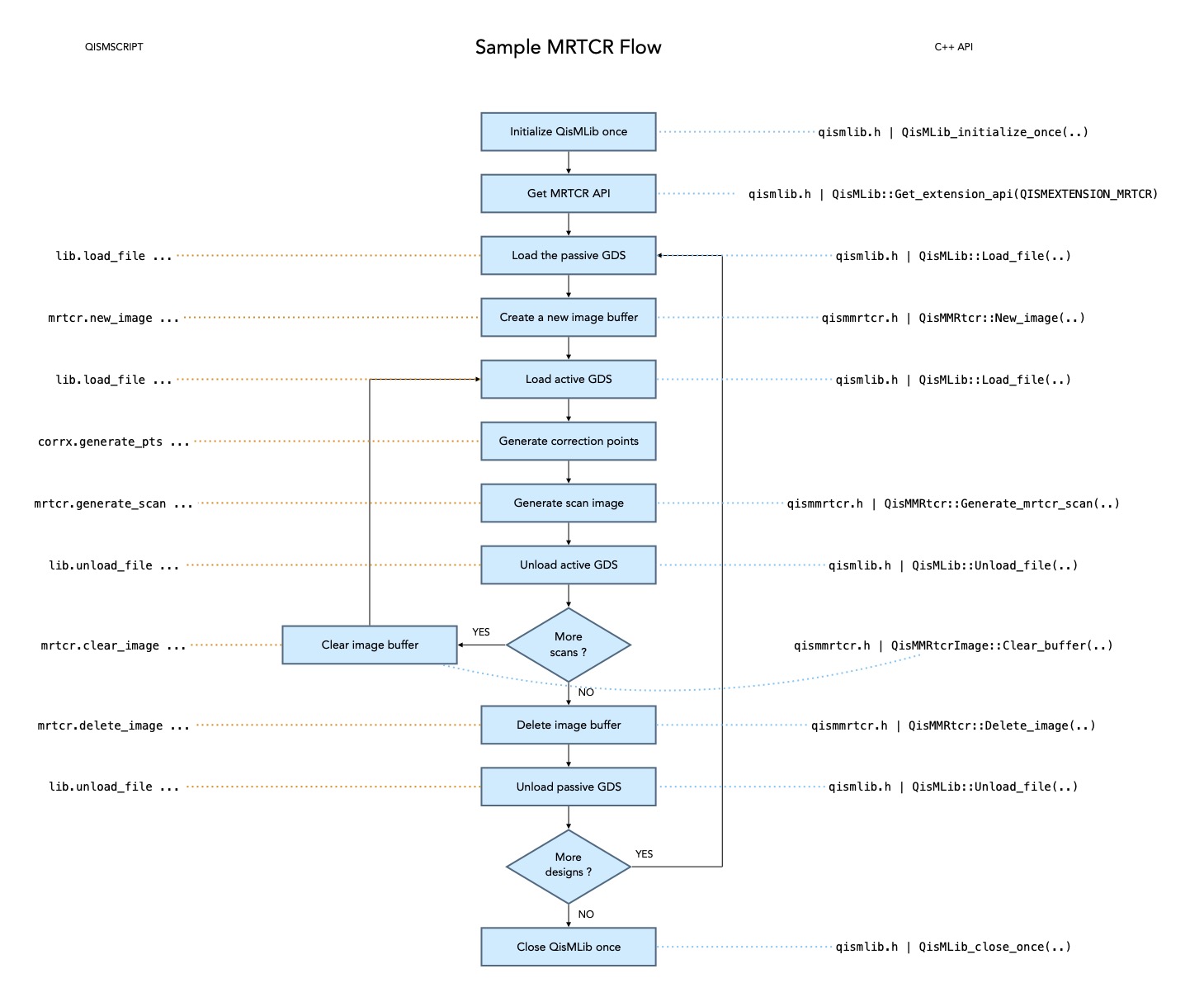
See qismmrtcr.h for the corresponding C++ api
Some commands require a license
mrtcr.scan_info
xxxxxxxxxxmrtcr.scan_infostr={path};{minx},{miny},{maxx},{maxy}&file={var}&roi={var}
Split a string formatted as
{file_path};{minx},{miny},{maxx},{maxy}into two components --{file_path}and ROI{minx},..{maxy}&file=and&roi=if specified will create new string variables where the component values will be storedThis is just a utility commands to be used while reading a text file containing a list of scans, each composed of the active file path and ROI
mrtcr.new_opts
xxxxxxxxxxmrtcr.new_opts&opts={id}[cell={P | A},{name}][layers={P | A},{str}][!corrx={P | A}][{+ | -}corrx={P | A}][thrnum={n}][resolution={x},{y},{m|cm|mm|um|nm|in|mils|dpi|dbu}][format={path},{TIF | BMP | RAW | TIF8}][gds={path}[,{src}]][dither={value}][nopaths={P | A}][anylic]
Create an object to hold optional control parameters
&opts={id}specifies name of a variable (type QisMMRtcrOpts) to be associated with the newly created objectcell=specifies the view cell for eitherP(passive) orA(active) db(s). By default, the deepest top cell is usedlayers=specifies view layers for eitherP(passive) orA(active) db(s). By default, all layers are used!corrx=disables corrections forP(passive) orA(active) db(s). By default, corrections are enabled for both+corrx=enables all-point corrections forP(passive) orA(active) db(s).-corrx=enables 1-pt corrections for either db(s). By default,+corrx=Pand-corrx=Athrnum={n}specifies the no. threads (also no. licenses) to be usedresolution=specifies the image resolution along X and Y followed by the units. If resolution is not specified, polygons will not be rasterizedformat=if used creates an image file on disk at the specified{path}in one of the specified file formatsgds=if used creates a GDSII file on disk at the specified{path}containing polygons that were rasterized (after corrections). If{src}is specified, it represents the datatype where the original polygons will also be writtendither=specifies the dithering value (default 1.0)nopaths=converts all paths to boundaries before processing forP(passive) orA(active) databasesinvertif specified reverses the image polarity (makes 0/white data on 1/black background)anylicif specified will enable working with any number of licenses available even if less than requested. By default, any less than requested number of licenses is considered an errorEvery such object MUST be eventually destroyed using
mrtcr.delete_optsto avoid memory leak
mrtcr.delete_opts
xxxxxxxxxxmrtcr.delete_opts$opts={id}
Destroy the control parameters object associated with the variable
{id}(type QisMMRtcrOpts)
mrtcr.new_image
xxxxxxxxxxmrtcr.new_image&img={id}roi={minx}..{maxy}$opts={id}units={units_m},{grid_m} [anylic]
Create a buffer to hold a raster image (image object)
roi(must be valid) are the extents of the data (from both db(s)) to be processed. I.eroiis the extents of the image in data spaceThis is only used as a guide to determine the buffer size. The actual data extents will be used during mrtcr.generate_scan
For use with multiple scans, specify an ROI that's big enough to hold a little more than the largest of such scans
$opts={id}is name of a variable (type QisMMRtcrOpts) representing additional (optional) control parameters{units_m}and{grid_m}are the source data units and grid in meters (e.g1e-6and1e-9for a um file with nm resolution)On success, creates a new variable (type QisMMRtcrImage) named
{id} of &imgassociated with a new empty image objectThe newly created image will be blank and ready to use. Therefore, there is no need to do a separate mrtcr.clear_image on this image before the first use
This image object MUST be eventually destroyed using
mrtcr.delete_imageto avoid resource leaksRequires a license. See license policy
mrtcr.delete_image
xxxxxxxxxxmrtcr.delete_image$img={id}
Destroy an image object represented by the variable named
{id}(type QisMMRtcrImage) and free any associated licenses
mrtcr.clear_image
xxxxxxxxxxmrtcr.clear_image$img={id}[thrnum={nt}][invert]
Reset all the pixels in the image buffer
$img={id}is the name of a variable (type QisMMRtcrImage) associated with the image to be clearedthrnum={nt}is the no. threads (>0) to be usedinvertif specified sets the buffer pixels to 1s
mrtcr.generate_scan
xxxxxxxxxxmrtcr.generate_scan$passive={id}roi={minx}..{maxy}*img={id}[$active={id}][$opts={id}][corrx={x},{y},{dx},{dy}..]
Generate a monochrome raster image (1bpp) by collecting polygons from a passive db, optionally an active db; with corrections if specified
$passive={id}is the name of a variable (type QisMFile*) associated with the db representing passive dataroi(must be valid) are the extents of the data (from both db(s)) to be processed. I.eroiis the extents of the image in data space$active={id}(if specified) is the name of a variable (type QisMFile*) associated with the db representing active dataBoth passive and active db(s) MUST have the same units and grid
*img={id}is the name of a variable (type QisMMRtcrImage) to be associated with the raster image on successful return. At the time of the call, if{id}already references an existing raster image, the existing image buffer will be re-used (as long as it big enough to hold the new image)corrx={x},{y},{dx},{dy}(if specified) is a set of measured points for applying bi-linear distortion to the source data. Each correction point is represented by FOUR numbers --{x},{y},{dx},{dy}where{dx},{dy}is the measured distortion at{x},{y}. These values are in the user units (data space)$opts={id}is name of a variable (type QisMMRtcrOpts) to additional (optional) control parametersOn success,
*img={id}will point to the raster image object. That object can be re-used for the next scan. Eventually, it MUST be explicitly destroyed using mrtcr.delete_image to avoid resource leak. Note --If the re-used buffer is not enough to hold the new image, it will be automatically destroyed and a new buffer will be allocated internally in it's place
This way,
*img={id}will always point to the output raster image whether or not the buffer was re-used
This operation will require a license ONLY IF an existing image buffer was not specified. I.e
{id} of *imgdoes not exist at the time of this call
QisMMRtcr Licensing (API)
Product name :
QisMMRtcrLicense code :
11303Acquire : During New_image depending on the no. of threads requested (
QisMMRtcrOpts::OPT_THRNUM)Release : During Delete_image, all the licenses that were held are released at once
Policy : Depending on
QisMMRtcrOpts::OPT_ANY_LIC, either all of the requested licenses MUST be available to proceed or any number of available licenses can be used
QisMMRtcr Licensing (Script)
Product name :
QisMMRtcrLicense code :
11303Acquire : During mrtcr.new_image depending on the no. of threads requested (
thrnum={n})Release : During mrtcr.delete_image, all the licenses that were held are released at once
Policy : Depending on
anylicoption, either all of the requested licenses MUST be available to proceed or any number of available licenses can be used
QisMMRtcr Version History
qismmrtcr dll/so v1.0 04-2023
First cut
Last Updated -- Sun Apr 6 19:31:13 UTC 2025