
Normally when you attempt to extract a window or windows of data from a GDSII/OASIS file that is hierarchical, the hierarchy must be completely flattened or exploded before entities that cross the window can be computed and extracted. The resulting file is flat and can be quite large if the region extracted was large and dense.
HExtract is a command line based engine used to extract a window out of a GDSII or OASIS file while preserving as much hierarchy as is possible. It does this by analyzing whether a particular cell placement is completely inside of the desired window, completely outside of the desired window or crosses the boundary of the desired window.
User Controls
The user defines the coordinates of the window to extract, the cell to start with, as well as which layers to extract to the output file.
The user can also specify a tiling parameter that will create many tiled outputs, each with its own filename identifying the location in the array of tiles.
For applications where user display/interaction is preferred HExtract is available as a plug-in to Qckvu3.
As more packaging is done "on wafer" it becomes necessary to create large masks that define openings, RDL, UMB and BUMP stencils. This note describes how we do this using a combination of GDS-SR and HExract.
Hextract can be used to convert OASIS file to GDSII files - useful when you have applications that can't read OASIS.
HExtract is command line based. Syntax and examples are shown below:
hextract64 <input_file> <output_file> [options]


hextract64                 name/path to the executable  - may vary depending on the platform
                           and whether it is 32 or 64 bit implementation.

input_file                 Path/Filename of the source GDSII/OASIS file.
                           This file can be one of the following types :
                            GDSII
                            OASIS
                            QIS 'Load' Cache [*.load.(b32 | b64 | l32 | l64)] *
                            QIS 'DbLoad' Cache [*.dbload.(b32 | b64 | l32 | l64)] *

                           * The appropriate supporting files (scan, GDSII) must also be
                           present in the same directory as the cache file.


output_file                Path/Filename path of file to be created. default is GDSII.
Pre-Filters - Default: All layers and non-empty cells are loaded
-cell:cell_name            Specify the cell to be extracted. If no name specified, the program
                           will determine the top level cell by computing which cell has the
                           deepest tree below it.

-top:name                  Specify the name of the top level cell in the output GDSII file.
                           If not specified this defaults to the name of the cell used from the
                           input file.

-ignorecell_names:list     Ignore the definition and all references to the specified cells while
                           reading the input file. The list consists of cell names separated by a
                           commma. Cell names are case sensitive.

-ignorecell_expr:("unix" | "dos"),expr1,expr2,...

                           Ignore the definition and all references to the cells that match the
                           specified regular expressionswhile reading the input file.

-layers:layer_string       Specify the layers to be extracted. (default: All layers)
                           layer_string := All | layer[:datatype][,layer[:datatype]]*

                           OR

                           layer_string := map[,map]*
                           map := layer[:datatype]-layer[:datatype]
                                  | layer[:datatype]-NULL
                                    | ALL-layer[:datatype]
                                      | ALL-NULL
Regions of Extractions - select only one of the available options
-window:minX,minY,maxX,maxY  Specify a window for extraction. Data crossing the window will
                             either be clipped or not depending on the absence or presence
                             of the -noclip option.

-windows:                    allows specification of more than one window. Use the same syntax
                             as for window but use a colon after each set of 4 coordinates
                             i.e. -windows:0,0,2,2:1,2,4,5:5,9,6,12

windows@[File_Path]          Extract one or more rectangular windows from file.
                             Each line in File_Path is MinX,MinY,MaxX,MaxY

-polywindow:X1,Y1,...Xn,Yn   extract a polygonal region defined by the boundary vertices listed.
                             The polygon so defined should not cross or touch itself. You can
                             specify more than one polygon by using the : as a delimiter between
                             boundary definitions.

-polywindow@File_Path        Extract one or more polygonal windows from file.
                             Each line in File_Path is Polygon.

-roundwindow:Cx,Cy,R,ArcRes,Chord_Error

                            Defines a round clipping window where Cx,Cy is the center of the
                            circle, R is the radius, and ArcRes is the segmentation angle. Or
                            you can specify a Chord Error value that represents the max error
                            between an ideal arc and the approximation using segments.


-roundwindow@file           Use a file to hold one or more round clipping windows. Each line
                            in the file follws the -roundwindow: syntax.

-complement                 Extract the complement of the specified window/regions.
                            -tile and -tilesz options cannot be used with this option.
# Clipping Options
# Default: Partially crossing polygons are clipped, partially crossing references are exploded
-noclip                    Do not clip the data crossing the extraction window.

-drop_partial_polys        Partially crossing polygons are dropped. Partially crossing
                           cell placements are exploded.

-clip:{= | List_of_Cell_Names}   If = is used, all partially crossing references are dropped.
                                 Partially crossing polygons of the view cell are clipped.
                                 If List_of_Cell_Names contains a comma separated sequence of
                                 cell names, then all partially crossing references to those
                                 cells are dropped.
                                 Partially crossing references to other cells are exploded.


Tiling Options

-tilesz:width,height       Divide the extraction window into tiles of size (width x height)
                           (in user units.)
                           This may generate more than one output files. Each of these output
                           files will have a suffix indicating its position in the array of tiles.


-tile:columns,rows         Divide the extraction window into (rows x columns) tiles of equal size.
                           This will generate (rows x columns) output files. Each of these output
                           files will have a suffix indicating its row and column. e.g
                           file_name.row.col.gds (default: rows = 1, columns = 1).
Transformation Options
Transformations are applied to the top cell in the output file.
-scale:S                   scale up output coordinates by S

-angle:R                   rotate output by this amount in degrees (postive angle = CCW)

-flipY                     Reflect about the X-axis (flip-Y)

-translateX:X              "move" coordinates by this value in X

-translateY:Y              "move" coordinates by this amount in Y


# Miscellaneous Directives

-notext                  Do not extract TEXT data.

-nopaths                 Convert any path data into boundaries. This results in better clipping
                         at window boundary and is required for area based filtering.

-load2mem                Load the source file (GDSII or OASIS or DbLoad Cache) to memory
                         for faster operations.(at the costof consuming more run-time memory.)

-oasis                   This option results in an OASIS output file with reasonable compression
                         using modality and indexing. The output file does not carry any CBLOCKs.

-oasis+                  This option results in an OASIS output with enhanced compression using
                         CBLOCKs in addition to modality and indexing.


-silent                  Supress messages written to stdout or stderr. default behavior is to write
                         messages to stdout, stderr)

-windowfiles             Each region of extraction will be extracted to a separate file. If
                         complement is used, then the complement of that region alone will be
                         extracted to a file.

-sliver:Value            Smallest polygon sliver value in file units.

-minpolyarea:Area        Smallest allowable polygon by area (in file units)

-flatten                 Flatten (explode) the output data.

-log:Log_File_Path or    creates new log file.

-log+:Log_File_Path      -log+ appends to existing log file.

-verbose                 emit details (for both logging and usage).
Extracting a Window from demo8.gds
We wish to extract a small window from the design called demo8.gds. We want all of the layers and want to use the top level structure of demo8. The output and input file are both located in the working directory.
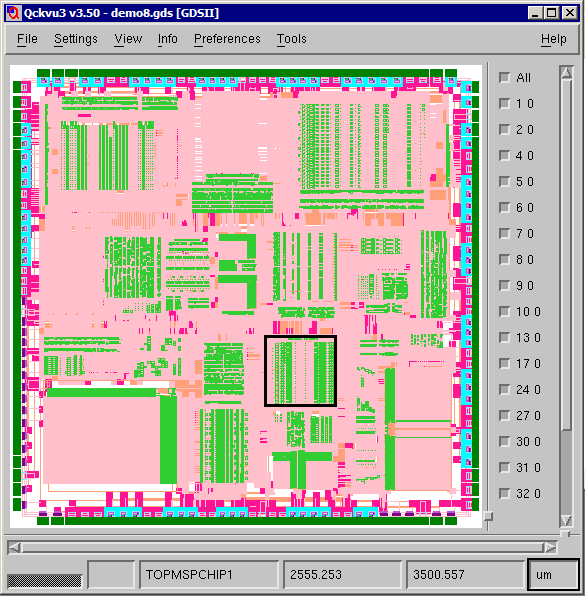
The output file will be called extract_hex.gds and its top level structure will be named TOP. This example was run on our linux box.
the command line (shown broken to fit on page)
$ $CAD/hextract/bin/hextract64
         demo8.gds
            extract_hex.gds
               -top:TOP
                  -layers:ALL
                       -window:394.445,-2265.683,1854.705,-813.302
Once [enter] has been pressed the program prints to stdout (my console):
Hierarchy Extractor v1.03 rcs(1.35 2010/01/25)
Build 10.01.25.16.59 on Linux 2.6.9-5.ELsmp [x86_64] Architecture x86_64

(c) 2009 Artwork Conversion Software Inc.
417 Ingalls St. Santa Cruz CA 95060
Tel  : (831) 426-6163

Email: info@artwork.com
Web  : www.artwork.com

Command Line:

/home/cad/hextract/bin/hextract64
          demo8.gds
             extract_hex.gds
                -top:TOP
                    -layers:ALL
                         -window:394.445,-2265.683,1854.705,-813.302


QisLib v2.67 (November 25, 2009)

Loading Extractor Engine ... done.
Initializing Extractor Engine ... done.

XtrakH v1.07 rcs(1.51 2009/11/19) Build 10.01.25.16.59 [64bit]

Opening input GDSII file demo8.gds

Scanning...   0%
Scanning... 100%
Scanning... 100%
Scanning in 0 min 0 sec
Loading...   0%
Loading...  57%
Loading... 100%
Loading in 0 min 1 sec

Extracting file extract_hex.gds (394.445, -2265.68, 1854.7, -813.302)

<End Of Operation> (1.735 sec)
Comparing the Size of the Flat vs Hierarchical Extraction
If we extract the same region by flattening the hierarchy and compare the size of the two files we see that:
-rw-r--r-- 1 stevedb 29061198 demo8.gds
-rw-r--r-- 1 stevedb  1392640 extract_hex.gds
-rw-r--r-- 1 stevedb  9222144 flat_extract.gds
The source file, demo8.gds, is 29MB in size, the hierarchical extraction is 1.39 MB in size and the flattened extraction is 9.2 MB in size. Scaling these ratios up to larger files shows the value of keeping the extraction hierarchical.
To see how much hierarchy was preserved I did a "dump" of the cell tree for the extract_hex.gds file:
TOP
  |_  G130S0F36
  |_- G130S69F35
      |_  G51S3F35
  |_- G130S101F35
      |_  G51S3F35
  |_- G130S105F35
      |_  G51S6F35
  |_- G130S29F35
      |_  G7S2F35
  |_  STDAND2$STS
  |_  STDINV$STS
  |_  STDNOR2$STS
  |_  SCLATCH$F36
  |_  SCINV$F36
  |_  G130S104F35
  |_- G130S95F35
      |_  G51S4F35
  |_- G130S146F35
      |_  G51S7F35
  |_- G130S108F35
      |_  G51S7F35
  |_- STDOA22$STS
      |_  G51S0STS
  |_  STDOR4$STS
|
  |_  G130S4F35
  |_  SCNOR2$F36
  |_- G130S103F35
      |_  G7S1F35
  |_  STDOR2$STS
  |_- TOPINDEXNOISE_INDEXDP1
      |_- G111S1F35
          |_  G193S1F35
      |_  G206S1F36
      |_  G139S0F36
      |_  G47S9F35
      |_- G203S2F36
          |_- G36S0F36
              |_  G143S0F36
      |_  G197S1F36
      |_  G165S2F36
      |_  G191S1F35
      |_- G203S3F36
          |_  G189S0F36
      |_  G202S0F36
      |_  G73S0F36
      |_  G74S2F35
      |_  G94S0F36
      |_- G111S2F35
          |_  G193S2F35
      |_  G47S2F35
      |_  G175S0F36
|
      |_  G165S0F36
      |_  G102S0F36
      |_- G216S5F36
          |_  G0S0F36
          |_  G182S1F36
          |_  G22S0F36
      |_- G216S0F36
          |_  G0S0F36
          |_  G80S0F36
          |_  G22S0F36
      |_- G216S9F36
          |_  G222S1F36
          |_  G177S1F36
          |_  G164S1F36
      |_- G216S6F36
          |_  G0S1F36
          |_  G223S0F36
          |_  G22S1F36
      |_- G216S11F36
          |_  G222S3F36
          |_  G177S3F36
          |_  G169S1F36
      |_  G74S1F35
      |_- G216S7F36
          |_  G0S0F36
          |_  G223S1F36
          |_  G22S0F36
|
      |_- G216S4F36
          |_  G0S0F36
          |_  G182S0F36
          |_  G22S0F36
      |_- G216S8F36
          |_  G222S0F36
          |_  G177S0F36
          |_  G164S0F36
      |_- G216S12F36
          |_  G222S4F36
          |_  G176S0F36
          |_  G169S2F36
      |_- G216S10F36
          |_  G222S2F36
          |_  G177S2F36
          |_  G169S0F36
|