
Merging Multiple GDSIIArtwork's GDSFILT utility can be run directly from a command line on Linux and Windows. This note demonstrates how to merge multiple files into one. Combining two or more GDSII files requires a certain care and understanding of the hierarchy since cell (structure) name collisions could cause undesirable effects in the output file. Example 1Combining Two Files - No OffsetConsider the case where we have two different GDSII files and we wish to combine them and we do not need or desire to modify or transform the coordinates in any way.
Input  1            Input  2                                   Output
CHIP_D123.GDS       DRACULA_OUTPUT.GDS                   CHIP_D123_FINAL.GDS
Top Cell= D123      Top Cell=OUT_D123                    Top Cell=D123_FINAL
Layer 1 = Well      Layer 50 = P+
Layer 2 = Active    Layer 51 = Poly
                    Layer 53 = Contact
                    Layer 54 = M1
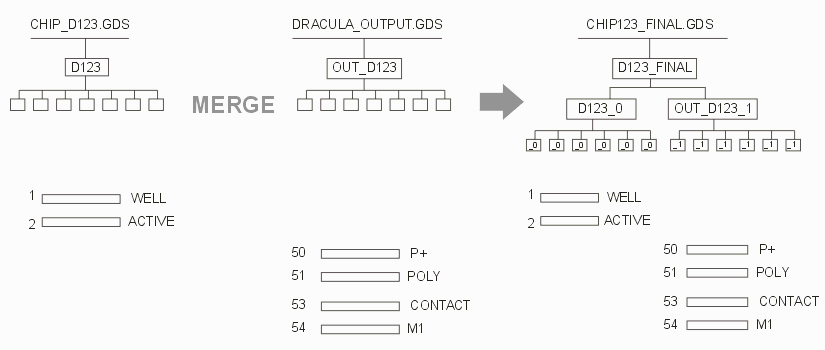 Here is the command line you can use with the "add" option. The command line is shown with breaks for clarity on this web page but there are no breaks in the actual command line. Text in italics is not part of the command line
gdsfilte                               executable engine (use full path)

 CHIP_D123.GDS                         input file

  CHIP_D123_FINAL.GDS                  output file

   D123                                top structure of input file

    -add DRACULA_OUTPUT.GDS            file to be added

      -combine D123_FINAL OUT_D123     use combine mode to place
                                       OUT_D123 under D123_FINAL
Difference Between Add, Blend and MergeThe difference between arguments "merge", "add", and "blend" is significant and each has its own use depending on what you are trying to accomplish. With the -add option the cell names of the "input file" are going to be appended with _0 in the output file, the cell names in the second file will be appended with _1 and so on. In the output file the cell data from all input files added is preserved; There is no "collision" between cell names. This option might be useful if you have two "near" identical GDSII files with minor changes and you want to overlay them and examine them layer by layer for differences. The -merge option works under the assumption that if cells have the same name, the data in them is the same. There is no renaming of cells in the output file. Since there can be only one definition per cell, the initial input file's cell contents will be used if the merged files contain duplicate definitions. The -blend option works under the assumption that if cells have the same name, the contents of that cell will be "blended" in the output file. There is no renaming of cells in the output file. For example, if cell A contains 5 polygons in file1 and same cell A contains 10 polygons in file2, then cell A in the output file will have 15 polygons. Example2Arraying a File With OffsetsConsider the case where you have a GDSII file and you wish to create a 2 x 2 array (say for creating a reticle). We will use one of Artwork's standard demo files (demo1.gds) and step it into a 2 x 2 array. In order to do this we must introduce an offset into each placement in the final output file. Now we could use -add but this would create a file 4 times as a large as the source file; since we know all 4 input files are identical there is no need to avoid cell name collisions. Therefore we select -merge to produce a smaller output file. 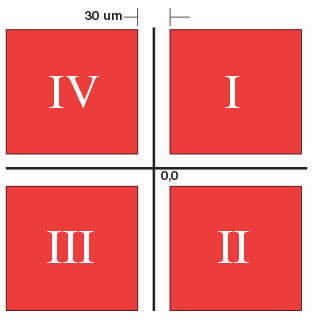
The output file name will be "reticle.gds" and the top cell in the output file will be called "2X2ARRAY". Under 2X2ARRAY will be 4 instances of the data in DEMO1.GDS. 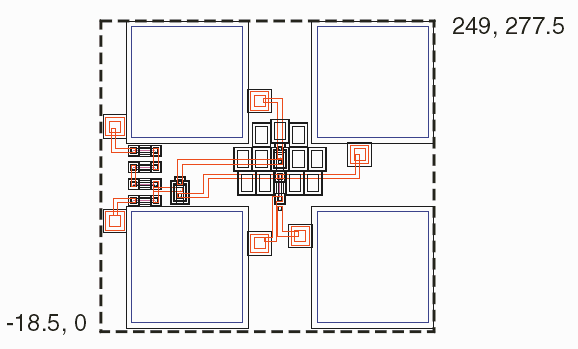 Calculating the OffsetsSome fancy math (OK, some simple arithmetic) is needed to calculate the desired insertion point for each instance of demo1.gds since it is not centered about 0,0. The reticle extents should be centered at 0,0; the center of demo1.gds is at 115.25,138.75. Therefore the insertion points, taking into account a street width of 30 um are:
    Quadrant   Center of Quad     After demo1.gds offset
    --------   ---------------    ------------------------
      I         148.75, 153.75       33.50,  15
     II         148.75,-153.75       33.50, -292.50
    III        -148.75,-153.75     -264.00, -292.50
     IV        -148.75, 153.75     -264.00,  15
Here is the command line. Once again, it is all one line but broken here so it can be annotated. Text in italics is not part of the command line but a short explanation of the line's argument.
 gdsfilte                                  gdsfilt engine executable

  demo1.gds                                input gdsii file

   reticle.gds                             output gdsii file name

    TOPMOSTST                              top cell name of demo1.gds

      -unixcmdline                         needed on Windows for legacy reasons

     -merge demo1.gds demo1.gds demo1.gds  merge these files with
                                           input file

      -combine 2X2ARRAY                    combine using this as top level
                                           cell in output

       TOPMOSTST TOPMOSTST TOPMOSTST       top cells of the merged files

        -offset  36.00,   7.5              offsets used for each insertion
                 36.00,-285.0
               -256.50,-285.0
               -256.50,   7.5
If you have done everything correctly you should have a reticle as shown below: 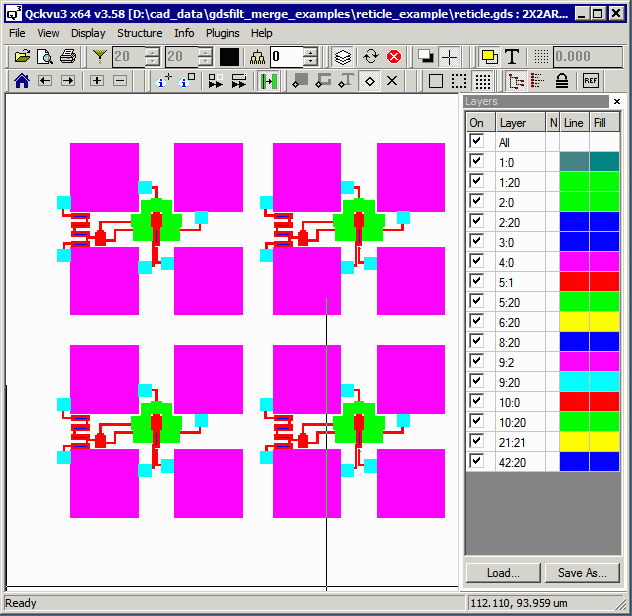 Test Files The two test files demo1.gds and reticle.gds are available for download here. example2_test_files.zip 5 KB zipped. Example3 - Merging files with -prefs : Secondary file includes cell defintions.In this example the main file (first on the command line) includes the top level data with cell insertion points but no cell definition in the main file.The merged files (second and after) include the cell definitions which we want to add to the top level data file. To do that we will still use the -merge option but we will add also the -prefs option. This option will preserve the references in the main file and redefine the empty definitions in the top level file with the definitions in the secondary files. ../bin/gdsfilt cell.gds demo5_new2.gds = -prefs -merge demo5.gds
In this example, the file cell.gds has a few cell names that also exist in the main file demo5.gds. |
| GDSFILT Page | Download | Revision History | Price |