
|
The Area Fill Manager program is controlled from a command line. The syntax is defined below:
areafillmgr64  inputfile outputfile structure operation(s) [options]

where

areafillmgr64  path and executable of the manager program

inputfile      input GDSII stream file or OASIS. The detection of file type
               is automatic and need not be specified as an argument.

outputfile     output file (ascii)

structure      structure to process. Use = if you want the areafill
               program to automatically find the top level structure.

operations(s)  describe boolean combination of layers.


 +             is a shorthand to process all layers present in the file
               individually

 +1,2,5        indicates that 2 and 5 are to be treated as if
               equivalent to 1, i.e. layers 1, 2 and 5
               are unionized together when computing areas

 +1,2;+5       indicates two different jobs; in the first job
               layers 1 and 2 are treated equivalently and only
               layer 5 is considered in the second job

 +1,2-5        directs that layer 5 is subtracted from the union
               of layers 1 and 2

 -1,2          directs the reversal of the union of layers 1 and 2


[options]

-tile:Dx,Dy                         to compute areas for tiles of dimension
                                    Dx by Dy. Overrides the nclip settings.

-window:xmin,ymin,xmax,ymax         process only the data contained within
                                    the window (xmin,ymin,xmax,ymax)

-nclip:nx,ny                        manual partitioning of the database.

 +nclip:1,1                         automatic partitioning of the database.


-details                            do detail logging


-notvalidate[:N]                    do not validate the input stream.
                                    N=2 input is convex in both X and Y
                                    N=1 input is convex in X


-perimeter[:P]                      do perimeter calculation. Options can be:
                                    -perimeter:x|y
                                    -perimeter:x+y


-falseperim                         do not add false edges to perimeter calculation.


-directional                        Implies perimeter calculation (-perimeter)
                                    Compute perimeter information along dominant
                                    direction of data in a cell


-lscan                              scan the file and report the top level
                                    structure name along with a list of
                                    layers containing data. Does not compute
                                    area density.

-nfork:N                            The number of processes that should be
                                    spawned by the areafill manager.

-dryrun                             calculate and display optimal -nfork
                                    value based on system resources.

-thrnum:M                           The number of threads per process that
                                    can be used.

                                    Note: the number of licenses available
                                    must be NxM. If nfork and thrnum are
                                    not specified, the areafillmgr will
                                    select values based on the number of
                                    available CPUs and licenses.
|
ExamplesThe command lines shown below have breaks added for clarity and annotation. Do not use such line breaks when creating the command line. In the first example, we want to get the total area of the data on layer 1.
../bin/areafill32            executable

    ./100umBoxArray.gds      input file

      ./total_area.txt       output file

        =                    use top structure

         +1                  process layer 1

           +nclip:1,1        automatically partion databse
In the second example, we wish to generate a table that shows the area in 100 x 100 um windows.
../bin/areafill32            executable

    ./100umBoxArray.gds      input file

      ./100umwindows.txt     output file

        =                    use top structure

         +1                  process layer 1

           -tile:100,100     divide into 100x100 um tiles
In this example, we will first generate 4 TIFF files and then we will make use of the -areamap command line option which creates a file with pixels having RGB values corresponding to area, X dir, and Y dir. The afill2tiff command will generate 4 TIFF files for the classes of data explained below: ../bin/afill2tiff l2.txt l2_perim_dir -rw-r--r--. 1 antonio users 90462 Apr 10 10:38 l2_perim_dir_layer_2.tif -rw-r--r--. 1 antonio users 90462 Apr 10 10:38 l2_perim_dir_Xdir_layer_2.tif -rw-r--r--. 1 antonio users 90462 Apr 10 10:38 l2_perim_dir_Ydir_layer_2.tif -rw-r--r--. 1 antonio users 90462 Apr 10 10:38 l2_perim_dir_Ddir_layer_2.tiflayer - refers to density where 0 represents no fill, and 255 represents 100 % fill Xdir - relative perimeter in the X direction 0 - 255 corresponds to 0 to 100 % of normalizing perimeter Ydir - relative perimeter in the Y direction 0 - 255 corresponds to 0 to 100 % of normalizing perimeter Ddir - dominant perimeter direction from -90 to 89 degrees in 1 degree increments from to 0 to 255 The -areamap command line option creates an additional file with pixels having RGB values corresponding to area, X dir, and Y dir ../bin/afill2tiff l2.txt l2_areamap -areamap -rw-r--r--. 1 antonio users 90462 Apr 10 10:38 l2_areamap_layer_2.tif -rw-r--r--. 1 antonio users 90462 Apr 10 10:38 l2_areamap_Xdir_layer_2.tif -rw-r--r--. 1 antonio users 90462 Apr 10 10:38 l2_areamap_Ydir_layer_2.tif -rw-r--r--. 1 antonio users 90462 Apr 10 10:38 l2_areamap_Ddir_layer_2.tif -rw-r--r--. 1 antonio users 271740 Apr 10 10:38 l2_areamap_areamap_layer_2.tif 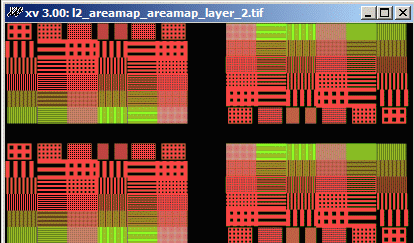
When using the -ddirmap command line option, the RGB values correspond to area, X dir, and dominant dir. ../bin/afill2tiff l2.txt l2_ddirmap -ddirmap -rw-r--r--. 1 antonio users 90462 Apr 10 10:38 l2_ddirmap_layer_2.tif -rw-r--r--. 1 antonio users 90462 Apr 10 10:38 l2_ddirmap_Xdir_layer_2.tif -rw-r--r--. 1 antonio users 90462 Apr 10 10:38 l2_ddirmap_Ydir_layer_2.tif -rw-r--r--. 1 antonio users 90462 Apr 10 10:38 l2_ddirmap_Ddir_layer_2.tif -rw-r--r--. 1 antonio users 271740 Apr 10 10:38 l2_ddirmap_ddirmap_layer_2.tif When using the -areamap! and -dirmap! command line options, the individual component files will be suppressed. ../bin/afill2tiff l2.txt l2_area -areamap\! -rw-r--r--. 1 antonio users 271738 Apr 10 10:47 l2_area_areamap_layer_2.tif ../bin/afill2tiff l2.txt l2_ddir -ddirmap\! -rw-r--r--. 1 antonio users 271738 Apr 10 10:47 l2_ddir_ddirmap_layer_2.tif |
| Download | Installation | Documentation | Command Line Syntax | Revision History |