December 2002
NOTE: THIS IS AN EXTREMELY OLD PAGE AND WE ONLY HAVE IT FOR ARCHIVAL PURPOSES.
The driver described here is for the old parallel port dongles on machines running Windows XP and Windows 2000.
Artwork's Windows programs can be secured using a Rainbow hardware key. The Artwork install software normally detects the operating system and installs a rainbow driver as needed.
When problems occur it sometimes helps to install the latest version of the driver as provided by Rainbow.
Q. What is the current version of Rainbow's key driver?
A. As of December 2002 it is 5.41.
Q. Does this version work with Windows 2000 and XP?
A. Yes.
Q. Do I need to do anything special when installing this driver?
A. No, the driver detects your operating system and installs itself correctly.
Q. Under what conditions should I try to install the system drivers?
A. You need to install the System Drivers if:
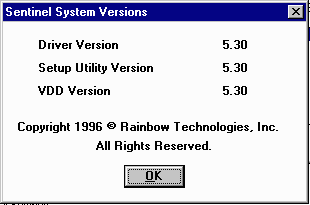
Q. How can I tell what version of the Rainbow driver is loaded?
A. On Windows NT go to:
Control Panel | Multimedia | Devices | Other Multimedia Devices
You should see an entry for Sentinel for i386 Systems Click on Properties and then on Settings and then on About. You should get a window that show the current version. as shown below:
A. On Windows 2000/XP
Run the registry editor (regedit.exe)
Open HKEY_LOCAL_MACHINE | SOFTWARE | Rainbow Technologies | Sentinel System Driver
You should see a parameter called CurrentVersion and the associated version number.

Note: you will only be able to run regedit if you have administrator privledges.