|
By Eric Chan, April 2 1997
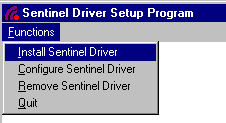
If you are using the Rainbow Sentinel-C hardware key provided by Artwork on Windows NT 4.0 you will need to install the 5.17 key driver in order for the key to work. Otherwise you will get the dreaded "KEY NOT FOUND" running in demo mode. ProcedureLog on as Administrator. The key driver cannot be installed by users without administrator permission.Insert the the key driver diskette into the disk drive. From CD go to the directory called sentinel. Click on Start | Run and Browse the diskette or CD Select setup.exe and click OK in the Run dialog box to run setup.exe. This will launch the Sentinel Driver Setup Program.
|
|
|
Select Functions | Install Sentinel Driver and it will ask for the path to the i386 directory. It is usually a subdirectory called i386 on the disk or CD. |

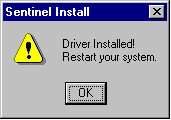 |
The driver is installed. Shut down and restart NT manually. Go to Start | Shut Down | Restart the Computer. |

|
Click on Start | Settings | Control Panel and run Multimedia from the Control Panel. |

|
Go to the Devices page of Multimedia dialog box.Double click on Other Multimedia Devices entry in the list and double click on Sentinel for i386; this will pop up a dialog box displaying the
status of the Sentinel driver.
|
 |
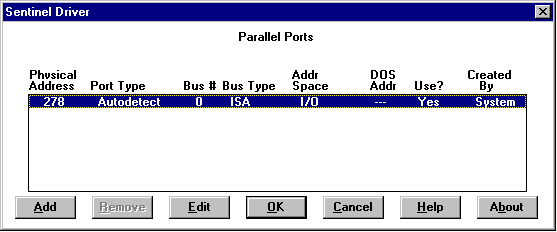
Clicking on Settings will provide more information on the driver settings which is normally not necessary unless the driver is not working. In this case, contact Artwork Conversion technical support. |

|
Clicking on About will provide the version number of the key driver. Only 5.17 or above is known to work properly under NT 4.0. Contact Artwork Conversion if version reported is earlier than 5.17. |
Uninstalling the Rainbow Key DriverLog on as Administrator.Run setup.exe from the key driver diskette. Choose Functions | Remove Sentinel Driver. The program will confirm your request; hit OK to remove the driver from the system. Shut down and restart the system manually.
Downloading the Rainbow Key DriverIf you need to get the Rainbow key driver for NT you can download the zip file here. Just unzip it (make sure you use the option to preserve directory structure) into a temporary directory. Then run the setup.exe program.rainbow.zip [77Kbytes zipped, 220Kbytes uncompressed] When unzipped you should see:
install.bat
oemsetup.inf
readme.doc
readme.txt
setup.exe
snti386.dll
dos/sentdos.sys
i386/rnbovtmp.dll
i386/sentinel.hlp
i386/sentemp.sys
Common ProblemsOld Software?If your application from Artwork Conversion was shipped before July 1996 it will not work with the new key drivers for NT 4.0. Contact Artwork for an update.
Parallel Port Conflicts?If the key driver just won't work due to non standard parallel port or conflict with other keys or parallel device drivers, we offer an alternative to hardware key locking using the network card's MAC address. See Hostid Locking. |