You should install LSERV4 on the NT machine that has been designated the license manager machine. This need not be "server" of files or applications - LSERV uses only a tiny amount of resources that is not noticeable. The license "server" should be a machine that is not normally turned off.
Details on how to install and test LSERV 4 are at:
Installing LSERV4 on NT
Update Your Client Machine's Environment Variable
When you run a program such a SWIFT or FA3ST on a machine, it needs to know which machine is running the license server so that it can send a message to that machine for a license. In order to determine this, SWIFT or FA3ST reads an user environment variable called LSHOST.
To set LSHOST use the Control Panel | System dialog box and click on the Environment tab. In the bottom half of the screen you should enter:
Variable: LSHOST
Value: name_of_license_manager
Then click on the SET button and then on OK.
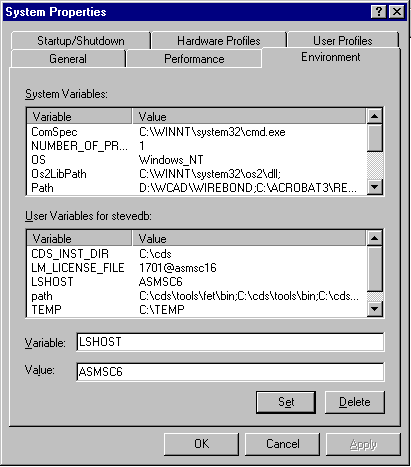
Note: while one would expect that NT immediately stores the new variable sometimes we have found the need to reboot NT before this variable is properly set.
Change the Key File
The ACS.KEY (or SWIFT.KEY or FA3ST.KEY) should be created or modified (depending on whether you have already installed software) to read as follows:
!#ACS NETWORK NETWORK NETWORK NETWORK NETWORK NETWORK NETWORKThis tells the SWIFT or FA3ST to get a license from the LSERV4 network server and not from the local machine's hardware key or MAC address.