
|
|
Compare2Files.bat: A Windows Script for Comparing Two Files |
||
|
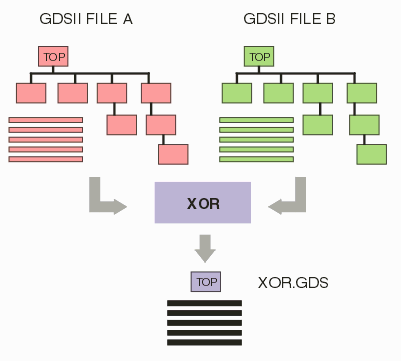
IC designers often need to compare and find small differences between two GDSII files -- typically one file is a slight revision of another file and they want to examine all the deltas on a layer by layer basis. To do this, one can use Qckbool's XOR engine. The XOR operator generates the difference between two polygons or collections of polygons. If both inputs are identical then the output of XOR is empty. Anything that you do see in an XOR output is the difference. |
 |
|
Compare2Files.batThe script, Compare2Files.bat, uses the Qckbool XOR engine and the gdsfilt engine to compare two GDSII files layer by layer. Certain assumptions are made:
Since the xor engine only works on layers within a single GDSII file, we do the following: Use gdsfilt to shift all the layers in one file by a known value - say by 200. So layer 5 in file 1 becomes layer 205. Merge the "shifted" file1 with file 2. Because we shifted the layers there is no collision of polygons on any given layer. run the xor engine on the merged file and output a new file with any differences. |
Example 1 - Comparing two filesHere is how the batch file looks like... rem define a variable for the path to the qckbool engine and gdsfilt engine set BINDIR=c:\wcad\qckbool rem define variables for the two input files set file1=iss.gds set file2=pad_mod.gds Rem Shift the layer set in file 1 by 200. Output goes to shifted.sf %BINDIR%\gdsfilte %file1% shifted.sf = -lyr0-200:200-400 -unixcmdline erase *.log rem Combine shifted.sf and file 2 - Output to xor_input.gds %BINDIR%\gdsfilte shifted.sf xor_input.gds = -unixcmdline -add %file2% -combine xor_input = erase *.log erase shifted.sf rem Perform xor, giving the hint that the layer sets are differ by 200. rem The output goes to xor_output.gds where the output data rem is shifted by 400 from the original set. Note: We selected to run with 2 threads. %BINDIR%\newxor xor_input.gds xor_output.gds xor_input = x -output_layer_offset:400 -input_layer_offset:200 +nclip:1,100 -postunion -thrnum:2 rem Last step is optional: Combine xor_input.gds and xor_output.gds and put the combined data in delta.gds. rem This provides a nice way to look at the XOR result. rem It would be sufficient to combine the XOR output with only one of the input files. %BINDIR%\gdsfilte xor_input.gds delta.gds = -unixcmdline -add xor_output.gds -combine xor_input = erase xor_input.log erase xor_input.gds erase *.ssn |
Example 2 - Comparing two files with xy offsetThis example compares layers 1 and 2 in two different files. Here is how the batch file looks like... rem Path to Qckbool engine. set BINDIR=c:\wcad\qckbool rem Input files.. set file1=iss.gds set file2=pad_mod.gds rem Shift the layer set in file 1 by 200. Output goes to shifted.sf. Include layers 1 and 2. Prune extraneous cells. %BINDIR%\gdsfilte %file1% shifted.sf = -lyr0-200:200-400 -unixcmdline -i1,2 -prune erase *.log rem Output goes to f2.sf. Include layers 1 and 2. Prune extraneous cells. %BINDIR%\gdsfilte %file2% f2.sf = -unixcmdline -i1,2 -prune erase *.log rem Combine shifted.sf and file 2 - Output to xor_input.gds. Shifted.sf os offset 0,0 while f2.sf is shifted 10,5 %BINDIR%\gdsfilte shifted.sf xor_input.gds = -unixcmdline -add f2.sf -combine xor_input = -offset 0,0 10,5 erase *.log erase shifted.sf f2.sf rem Perform xor, giving the hint that the layer sets are differ by 200. rem The output goes to xor_output.gds where the output data rem is shifted by 400 from the original set. Note: We selected to run with 2 threads. Use boolw32f instead of newxor. %BINDIR%\boolw32f xor_input.gds xor_output.gds xor_input 401;402 +1x201;+2x202 +nclip:1,100 -postunion -thrnum:2 rem Last step is optional: Combine xor_input.gds and xor_output.gds and put the combined data in delta.gds. rem This provides a nice way to look at the XOR result. rem It would be sufficient to combine the XOR output with only one of the input files. %BINDIR%\gdsfilte xor_input.gds delta.gds = -unixcmdline -add xor_output.gds -combine xor_input = erase xor_input.log erase xor_input.gds erase *.ssn |