
|
|
TiffExtract Programmatic Flow |
||
|
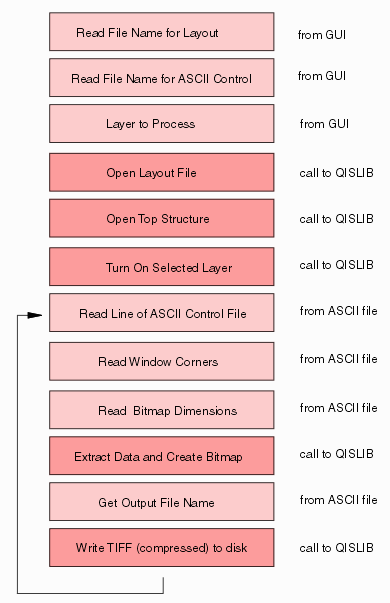
At right you can see the programmatic flow for TiffExtract. A simple GUI prompts the user to enter the GDSII (or OASIS) file to process, the layer to process and the name of the ASCII control file that contains the list of windows to extract. TiffExtract then makes calls to QISLIB to open the layout file, open the top structure and turn on only the layers the user has selected for rasterization. TiffExtract then reads the first line of the ASCII file to get the window to extract, the size of the bitmap file and the output file name. It then uses this information to call QISLIB and generate the bitmap in memory. The final step is to compress the bitmap and write it to disk. |
 |
|
The ASCII Control File |
||
|
The first 4 columns define the lower left and upper right of the window to extract. (Units match the GDSII or OASIS units.) The next two columns define the bitmap width and height in pixels. Note that it is possible to select values so that the DPI in X is different than the DPI in Y. The 7th column defines the output format. The 8th column defines the output file name for this window. |
600, 500, 605, 505 1024, 1024 TIFF 1.tif 2000, 2000, 2005, 2005 1024, 1024 TIFF 2.tif 500, 500, 505, 505 1024, 1024 TIFF 3.tif 600, 200, 605, 205 1024, 1024 TIFF 4.tif 200, 500, 205, 505 1024, 1024 TIFF 5.tif 500, 200, 505, 205 1024, 1024 TIFF 6.tif 600, 600, 605, 605 1024, 1024 TIFF 7.tif 2400, 2250, 2405, 2255 1024, 1024 TIFF 8.tif 600, 600, 610, 650 200, 1000 TIFF 9.tif |
|
The GUI |
||
|
The simple GUI we wrote for this example enables the user to select the layer to process, the GDSII file to process and to select a "coordinates" file which contains the window coordinates, the bitmap size, the output format and the output file name. Of course there are many alternative approaches to defining the windows to extract and one can specify DPI instead of a bitmap size. |
 |
|
Source Code?If you have a legitimate purposes for evaluating QISLIB to extract many small bitmaps from large layout files we would be glad to provide you the source code for TiffExtract. We can provide QISLIB (and the accompanying TiffExtract) on a variety of platforms including Windows 32/64 and Linux 32/64. To arrange this please contact: Steve DiBartolomeoApplications Manager Steve DiBartolomeo |
Next - QISLIB vs GDS_RIP - where are the computational bottlenecks?