Displaying Structure Outlines
When initially loading a GDSII file you may wish to present the user as quickly as possible with a layout view of the chip by cell. Each cell placement is represented by a rectangular outline of its bounding box and possibly some text showing the cell name.
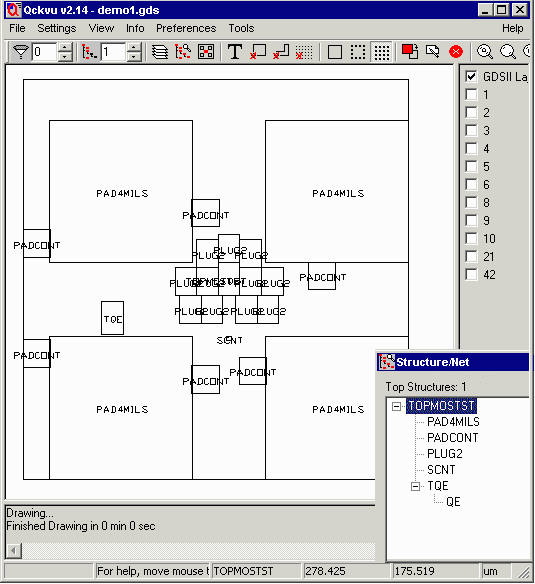
- demo1.gds - Qckvu shows the outline of the top level structure and those one level below it. In the lower right corner you can see the list of structures and their hierarchy.
Below we describe the calls and process one would use to obtain the required data from the QIS server.
Opening the GDSII File
First of course, one should open the GDSII file. The command:
Client: Open_GDSII \n
Client: demo1.gds  \n
is used along with commands used to assess the progress of the loading.
Finding the Top Structure
If you do not know the exact name of the top level structure there is a command that will return it:
Client: Get_Structure_Root /n
QIS returns one or more structure (cell) names. If the GDSII file has a single top structure then only one name is returned. However many GDSII files have multiple parallel "pyramids" within them and in such cases more than one name can be returned.
Example
Client: Get_Structure_Root /n
Server: TOPMOSTST /n
Getting the Outlines
There is an efficient QIS API command that returns all of the Structure References (SREF's) and gives you the insertion point, scale, rotation, mirroring and the coordinates of the box defining the structure. The client needs to apply the transforms to the box coordinates but this is a relatively simple process. We show details below:
Get_Structure_Tree \n
TOPMOSTST,2 \n
The value 2 following the name of the structure to start from instructs QIS to go 2 levels of hierarchy down. The server would return:
Vector_Data\n
S,PAD4MILS,TOPMOSTST,0.000,0.000,1.00000,0.00000,N,5,
0.000 0.000 99.000 0.000 99.000 99.000 0.000 99.000 0.000 0.000\n

Vector_Data\n
S,TQE,TOPMOSTST,124.500,135.000,1.00000,90.00000,N,5,
132.000 127.500 132.000 150.000 117.000 150.000 117.000 127.500 132.000 127.500\n

Vector_Data\n
S,PADCONT,TOPMOSTST,-1.500,79.500,1.00000,90.00000,N,5,
0.500 77.500 0.500 96.500 -18.500 96.500 -18.500 77.500 0.500 77.500\n

Vector_Data\n
S,SCNT,TOPMOSTST,124.500,97.500,1.00000,90.00000,N,5,
126.000 96.000 126.000 99.000 123.000 99.000 123.000 96.000 126.000 96.000\n

Get_Structure_Tree\n
How to Interpret the Structure Outline Data
The data returned can be used by the client to place and draw the structure outlines. Some computational work is required.S,structure,parent,x,y,scale,rotation,reflection(X or N),5,x1 y1 ... x5 y5 S - indicates structure data to follow structure - name of the structure (string) parent - name of this structure's parent (one level up in hierarchy) x,y - insertion coordinates scale - insertion scale rotation - insertion rotation (CCW from X axis) reflection - N=none, X = around X axis 5 - number of vertices to follow for the extents box x1 y1 - vertices of the extent box. Note that there are 5 sets and x2 y2 that x1 y1 == x5 y5 x3 y3 x4 y4 x5 y5