Setting Virtual Memory under Windows
QCKVU Windows can allocate up to 1.5GB of RAM. If you have less than 1.5GB RAM, it is important
to set the SWAP size (Virtual Memory) in a way that the sum of the swap and RAM will be around 1500MB
to make full use of QCKVU.
Failing to do so, will probably prevent QCKVU from loading files
in the 2GB range and above.
These are the steps to set swap space on your Windows system :
Go to Start, Click on Settings , then on Control Panel, System, and last Performace.
You should be able to see a screen like the one below. If you have 500MB RAM on your system, we
recommend to set the Virtual Memory to 1000MB.
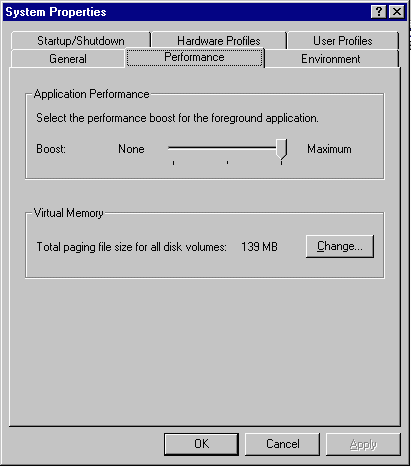
Click on the Change button and set the size to 1000MB. Save and reboot your system.
On Windows 2000 the process is very similar.
Go to Start, Click on Setting, Control Panel, System, Advanced, Performance options
and over there you will see a screen that will allow you to set the Virtual memory.