
|
Sample ApplicationHere we describe a sample application, mbs2tiff.exe, (for which the Microsoft C++ source/project files are available to qualified developers ...) to illustrate the use of the dll. GUIThe mbs2tiff.exe has a very simple GUI as shown below: 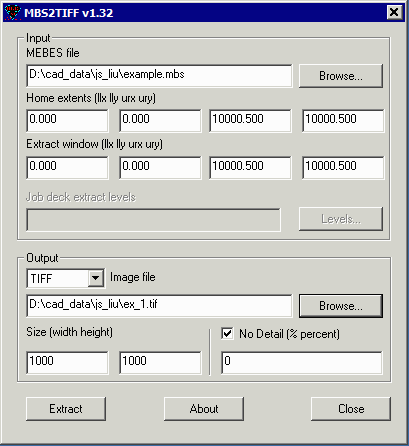 Input MEBES File - use the Browse button to nagvigate to and select a MEBES file or a JOB Deck file. Data Extents (llx,lly,urx,ury) - upon opening the file, mbs2tiff calls the acsMBS_GetExtents and gets back the extents of the data placing the information in these fields. Home Extents - (llx,lly,urx,ury) - displays the full extents of the data. Extract Window - (llx,lly,urx,ury) - the user enters the desired window (also known as the region of interest or ROI). This data will be passed to the acsMBS_SetROIWindow function call. Job Deck Extract Levels - a job deck may define mutliple levels - if a job deck is loaded then the user can control which level is processed. Output TIFF File - use the Browse button to select the name/directory of the output tiff file. This information will be passed as the filename argument in acsMBS_GetROIImageToDisk Size (width,height) - enter the width and height of the TIFF file in pixels. The information entered here will be passed as an argument to acsMBS_GetROIImageToDisk No Detail - (percent coverage) - if checked, the percent coverage will be used to determine whether a stripe will be rendered as black or white. Default value for percent coverage = 0. Bitmap - same as TIFF except output format is Windows BMP monochrome. GDSII File - if GDSII is selected the the output file will be in GDSII stream format. Union - if Union is checked touching trapezoids will be combined (unionized) into larger polygons. The user enters the max number of trapezoidds to be unionzed. If not set, the default = 500. Buttons Extract - when pressed makes the call to acsMBS_GetROIImageToDisk shich writes the output to file. If for some reason the return is non-zero a message is displayed describing the problem. About - reports the version and license for MBS2TIFF. Close - closes the mbs2tiff.exe program |
| Price | Download | Revision History |