Downloading and Installation on Solaris

Install the IKON card and Driver
The default driver name for this is /dev/ihcp0.

Install the RTL2VERSA program
This program is normally installed in the /usr/local/bin directory: should have 777 permission and be owned by root.


Configure a new Plotter
This may be difficult since the Solaris OS does not have any model interface for this type of raster printer. Here is the approach we took in some cases to force the correct printer.

Add local ACSLP0 with Admintool
We will use the admintool to create an new plotter and then manually modify some of the plotter onfiguration files. Our experience was that some machines prevented us from defining anything but a Postscript printer. So we defined a local Postscript printer and then modified the resource files. You must be root to run admintool.

# admintool [enter]
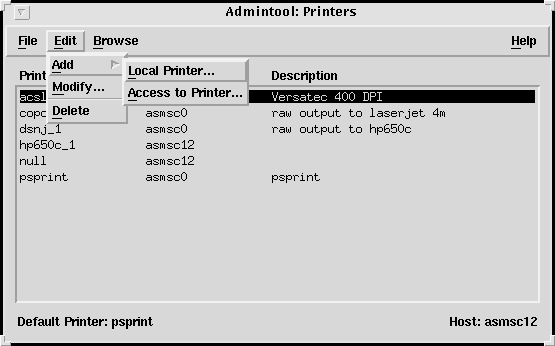

versa2.gif


The screen above was taken after we added the acslp0 printer but you get the idea. When you add a new local printer the following screen pops open.
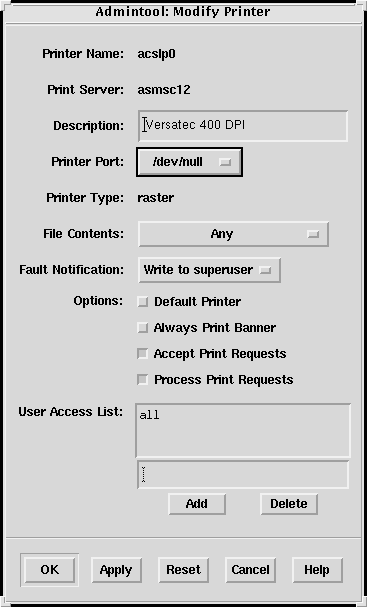


Printer Name: Call the printer acslp0 and describe it as a Versatec 400 DPI driver. Printer port is /dev/null.

Printer Type: There are quite a few choices but for some reason our Sparc 5 would not let us complete the definition unless we selected Postscript.

File Contents: select any.

Add: click on Add button to add this printer.

Apply: click on Apply then on OK.

versa1.gif


Now comes the fun part. You have to go into the printer adminstration area and modify a couple of files for this to work correctly. First, we modify the configuration file for acslp0 as shown below.

$ cd /usr/spool/lp/admins/lp/printers/acslp0 
$ ls 

alert.sh comment users.deny alert.vars configuration $ vi configuration Banner: off Content types: any Device: /dev/null Interface: /usr/lib/lp/model/rtl2versa Printer type: raster Modules: default

Now we need to modify the acslp0 file. We will use the dumbplot.sol as the model for this plotter. This file is located in the /usr/spool/lp/admin/lp/interfaces directory.

 $ cd /usr/spool/lp/admins/lp/interfaces 
 $ vi acslp0 

# $Source: /users/hpnp/odyssey/sh/RCS/dumbplot.sol,v $ 
# $Revision: 1.1 $ 
# 
# lp interface for dumb plotter # modified for Versatec by ACS 
copies=$4 
# Handle disable and cancel traps 
trap “trap 15;kill -15 0;exit 0” 15 

# The remaining arguments are files 

shift; shift; shift; shift; shift 
files=”$*” 

# Plot the spooled files 

i=1 while [ $i -le $copies ] 
do
          for file in $files 	
          do 
# command line arguments for rtl2versa 
# -pln1 - indicates 1 color per plane 
# -ikon use this for ikon cards default is for 116 card 
# -sd=/tmp directory for temporary lock files 
# -DD dot double 200 dpi plots to 400 dpi 
# -slp0.1 time to sleep in seconds per inch during rewind 
# -mg sends no merge tickmarks command 
# $file file variable 
# /dev/ihcp0 output device driver for Ikon. /dev/lp0 device driver for 116
 /usr/local/bin/rtl2versa -pln1 -ikon -sd=/tmp -slp0.1 -mg $file /dev/ihcp0 2>/tmp/log.$$ 
done
	i=`expr $i + 1` 
        done 

exit 0 

Printer Admin Directory for Solaris

/usr/spool/lp/admins/lp model printers interfaces dumplot.sol acslp0 acslp0 configuration


GDSPLOT Configuration For Versatec

Install GDSPLOT as you would for the HP 650C/750C. Then configure the plotter as follows for a color Versatec:

  • Plotter Type: HP 650C RTL TIFF
  • Page Dimensions:
  • Custom
  • Width= 42 inches for an 89441
  • Length= longest length you will plot (typically 120 inches)
  • margins=0,0,0,0 (none needed)
  • Orientation: Portrait Output Port: cat %s | lp -d acslp0
  • DPI - 400 or 200

    Notes:

    1. Never exceed the maximum width or the plotter will wrap the overflow around. Future versions of rtl2versa will include a max width and will truncate the plot.

    2. If you use 200 dpi then you must configure the acslp0 to call rtl2versa with the -DD option. This will send a command to the Versatec telling it to double each dot and line. Otherwise you will get a 400 dpi plot but 1/2 of the size you expected. One can define two plotters - acslp0 for 400 dpi and acslp1 for 200 dpi with dot doubling.

    Spool Area Requirements

    This is just an estimate. For each square foot of plotted area the required area to store the bitmap is:

    12 x 12 x 400 x 400 x 4 color planes/8 bits per byte= 11.5 Mbytes

    divide by 4 for typical RTL compression = 2.88 Mbytes multiply by 2 since RTL2VERSA needs an extra copy of the rtl file = 5.76 Mbytes.

    Therefore to plot a 42 x 120 inch strip you need a minimum of ( 42 x 120) / (12x12) x 5.76 = 201 Mbytes of spool area. If you do not have this much space then your maximum strips should be smaller.

  • Download RTL2VERSA

    You can download the RTL2VERSA executive for SunOS and related tools here:

    rtl2versa.solaris.v112.zip [0.6 Mbyte zipped password required]