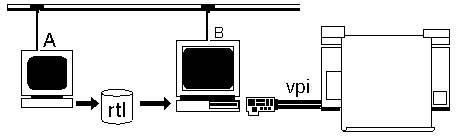
Install GDSPLOT as you would for the HP 650C/750C. Then configure the
plotter as follows for a color Versatec:
Advanced Setup
DPI - 400 or 200 depending on your plotter
Notes:
1. Never exceed the maximum width or the plotter will wrap the overflow around. Future versions of rtl2versa will include a max width and will truncate the plot.
2. If you use 200 dpi then you must configure the acslp0 to call rtl2versa with the -DD option. This will send a command to the Versatec telling it to double each dot and line. Otherwise you will get a 400 dpi plot but 1/2 of the size you expected. One can define two plotters - acslp0 for 400 dpi and acslp1 for 200 dpi with dot doubling.
Spool Area Requirements
This is just an estimate. For each square foot of plotted area the required area to store the bitmap is:
12 x 12 x 400 x 400 x 4 color planes/8 bits per byte= 11.5 Mbytes
divide by 4 for typical RTL compression = 2.88 Mbytes
Multiply by 2 since RTL2VERSA needs an extra copy of the rtl file = 5.76 Mbytes.
Therefore to plot a 42 x 120 inch strip at 400 dpi you need a minimum of:
5.76 x ( 42 x 120) / (12x12) = 201 Mbytes of spool area.
If you do not have this much space then your maximum strips should be smaller.