iGDSPLOT - Plot Interface to Cadence Virtuoso/DFII

iGDSPLOT is a Skill interface that enables users of Cadence's Virtuoso layout tool to plot directly from within Virtuoso using the high speed GDSPLOT engines. The interface gets the required plotting information from a dialog box and then takes care of the plotting work in the background.
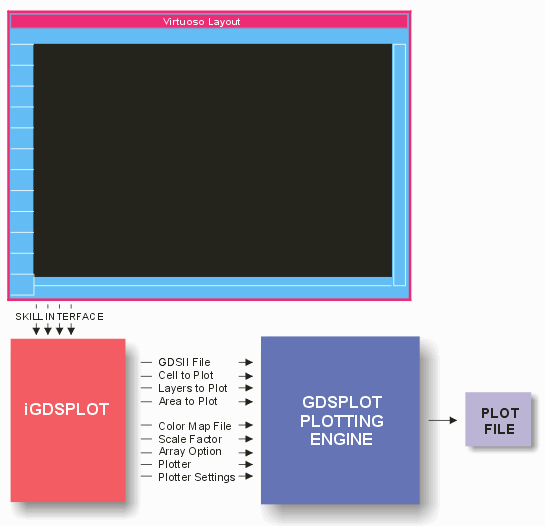
The interface has been tested on DFII 4.43 through 4.46. As Cadence updates their DFII release we will also update the interface as needed.

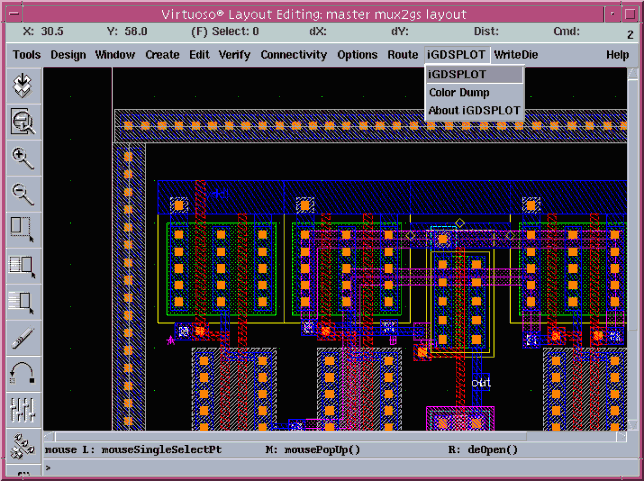
To plot a design use the iGDSPLOT pulldown and select iGDSPLOT.


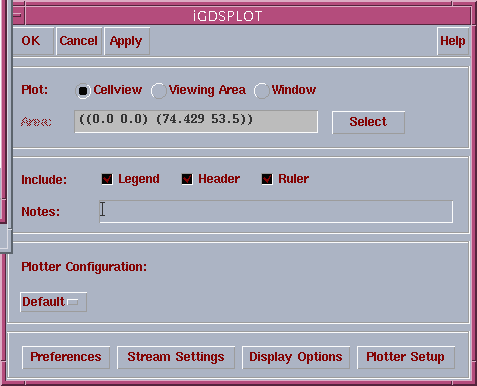
The Main iGDSPLOT Dialog Box

Once all of your settings are established you can plot directly from the main dialog box.


Cell View

If selected, the area plotted is equal to the extents of the cell under consideration.

Viewing Area

If selected, the area plotted is equal to the current display extents...

Window

Use the mouse to window an area to plot or you can type in the plot coordinates.

iGDSPLOT main dialog box

Legend

When selected causes a layer legend (fill pattern vs. layer number/name) to appear across the top of the plot.

Header

When selected, causes a line of text describing the library, cell, scale, layers plotted, time and date to appear across the top of the plot.

Ruler

When selected causes a ruler to be drawn all around the plot with tick marks so that measurements can be made.

Notes

User supplied string that appears in the header.


Plotter Configuration

The settings for the plotter (output type, plot queue, page size, page margins, page orientation ....) are stored in an ascii file. If you have several different plotters or printers you can press the button and select the desired plotter once you have defined its characteristics.


Additional Dialogs

Preferences

Set preferences such as fill pattern generation (automatic or manual), working directory, deletion of intermediate files...

Stream Settings

Displays the current layer to stream number settings and allows automatic setup of these settings if none are already defined.

Display Options

Pressing this button opens a new dialog that lets you set plotting options for scale factor, array, and hierarchy.

Plotter Setup

Pressing this button opens a dialog enabling you to define plotter type, page size, margins, plot queue etc...


Flow Chart

Price

Download

iGDSPLOT
Datasheet

XGDSPLOT
Datasheet

Artwork Home


ARTWORK CONVERSION SOFTWARE, INC.       Company Profile
417 Ingalls St., Santa Cruz, CA 95060    Tel (831) 426-6163     Fax 426-2824    email: info@artwork.com