There are quite a few ways that the original design data will be tweaked as we go through the translation from the original CAD data to the mask.
- Grid Snap Errors
- arc and spline conversion errors
- polygon size errors
Grid Snap Errors
Many designers of optical structures require smoothly tapering edges in order to achieve desired results -- however all IC mask writing and CAD data is grid based. The grid value varies - but if your design depends on data dimensions near the grid size it becomes a very critical factor in the final output. The illustration below shows how a structure that is designed without considering the grid will be modified during data conversion.
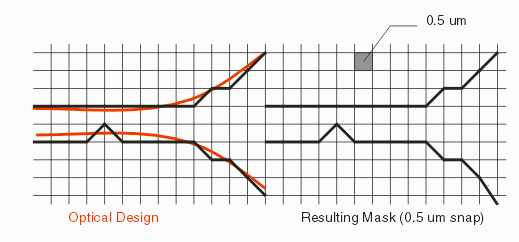
The grid snap errors often don't show up in the first conversion -- from DXF to GDSII. That's because the GDSII output can be set to an impossibly small grid value - 0.001 um. However the next conversion step, to MEBES, will enforce the mask machine's grid snap. This varies from machine to machine but ranges in the 0.5 to 0.25 um range. A 0.25 um grid snap can still be noticeable for many optical structures.
Solutions?One cannot remove the grid snap behavior of the conversion -- but you can modify your design approach to recognize it and to work with the snap -- not against it. First, you must verify with your mask vendor exactly what the value of snap is. Some e-beam machines can run at different grid (also called addressibility) values. Typically the finer grid settings cause the machine to run much slower, so if grid snap is an issue, make sure that your vendor is running the machine at it's best setting.
Second, if you do your own GDSII conversion, you can set the output grid to the same value as the e-beam machine's grid. Then, inspecting the resulting GDSII should show the same snap as the final output.
Third, you can modify your design tools so that you superimpose the grid over your CAD data and modify your data in critical areas so that the snap is controlled. For example, take special care that the two edges of a waveguide are positioned on grid such that they both snap in the same direction at the same time -- otherwise you may see some width discontinuities.
Next: Arc Conversion Errors