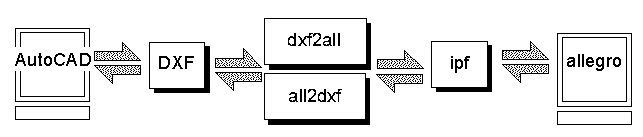
DescriptionThis translator reads a DXF file generated by AutoCAD or by other mechanical drafting programs and converts it to an Allegro intermediate plot file. The plot file can then be imported into Allegro. This is a simple but effective way to load in board outlines, component placements or other layout related information without manually drawing it. |
dxf2all  in_file  out_file  [units U] [-scale X] [-fontdir S]

[-nonode]

where

infile        The DXF input file name

outfile       The Allegro plt file name

-units U      Unit of DXF file, inch, mil, cm, mm, um.
              If not specified defaults to IN.

-scale X      Scale output by X.  Defaults=1

-fontdir S    S specifies theshx files directory

-text explode Explodes strings of text into strokes

-text ignore  Ignores strings of text in the DXF file

-nodim        Suppress dimensions (those where AutoCAD has
              created them using the *d block name).

-nohatch      Suppress hatching (those where AutoCAD has used
              the *h block for hatch lines).

-outline      Polylines with width are transalted to an outline,

-acres X      Arc resolution for translating arcs to lines.
              Default value is 9 degrees but you can specify
              rande from 2 degrees to 15 degrees.

-nonode       Nodes are not translated.
|
Detailed NotesBlocks - AutoCAD blocks are named groups of entities that can be reused. No such equivalent exists in ipf so the translator simply explodes the block. Blocks can contain other blocks; this is called nesting. dxf2all keeps exploding the nested blocks until only entities are left. A block can be inserted with scaling, rotation or mirroring.Units - An AutoCAD DXF file is essentially dimensionless. A line 10 units long could represent mils, inches, microns etc...This is why you should always specify the units of the DXF file when running the translation. Precision - AutoCAD stores all data values using double precision floating point numbers and users can specify the number of places that the DXF file will contain. The default is 6 places so a drawing in inches will have data to 0.000001 inch. However, the ipf format is in mils with data resolution to 0.001 inch. For critical applications such as importing microwave circuit layouts this may not be sufficient; one may wish to use a scale factor of 10 in order to obtain better precision. 3D Data - AutoCAD can create 3D data - dxf2all ignores all Z axis data and only translates X,Y coordinates. dxf2all does not support any of the new 3D entities in ACAD R13 that are based on ACIS. Text Styles, Fonts and Mapping - AutoCAD Text and ipf text are handled completely differenty and we have come up with a clever scheme to map them as closely as possible.
|
This sequence will open the artwork screen.
The plot image will appear at the cursor. The Allegro operator needs to pick a location on the screen to place the plot on. Before placing the plot on the screen you can click middle mouse button to show options:
Most plots loaded are flat which means all the information is on one layer. Since the black pen is normally pen number 1 on the carousel, create a PEN1 subclass or rename an existing subclass to PEN1, and then load the plot into it.
One limitation is that elements in Allegro can be changed from one subclass to another, but they can't change class. For example, many DXF files convey information about the board outline. Allegro has a standard subclass "BOARD OUTLINE" but it is in class "BOARD GEOMETRY", and as mentioned elements in class "MANUFACTURING" can not be move to class "BOARD GEOMETRY".
One way to overcome the problem is to import GERBER data into Allegro, since GERBER files can be loaded into any subclass of any class. The problem then is that all text elements are broken to line elements and are not editable. However if this method is more useful in your environment then you should examine Artwork's DXF to GERBER translator.
     Program version and date compiled: dxf2all V 1.00  May 13, 1996
     name of the input file: p_56_05.dxf
     command line: p_56_05.dxf   ref.ipf  -units IN  -scale 1
     run date and time: May 19, 1996  04:30:26

     Info about the DXF file

      Text Table (first 16 entries)

        Number       font          height      width
       of String                               factor
       Insertions

        56           txt.shx       .050          1
        32           txt.shx       .040          1
         1           romans.shx    .060          0.8


      DXF Layer Table

       Layer Name     Color Number

       solder               7
       component            2
       padmaster            3

     Block Table

       DR18
       RND50
       SQ50
       SW75
       RE60X50


     Warnings and Errors
      No warnings or errors reported
Singe User Node Locked License                    $995.00
Floating Network License Option                   $300.00
Media (4mm DAT, 1/4 QIC, or 8 mm)*                $ 50.00
Printed Manual*                                   $ 50.00
Your release should include:

dxf2all                     program executable
allplmsg.txt                program message file
txt.shx                     default SHX font file
bench.ipf                   benchmark ipf file
bench.dxf                   benchmark DXF file

dxf2all.doc                 manual in ASCII format
dxf2all.ps                  manual in Postscript Format (printing)
dxf2all.manual.html         manual in HTML format for Mosaic/Netscape

INSTALL                     Unix Installation script
NETMSG1                     Text file for network licensing install
NETMSG2                     Text file for network licenseing install
INSTALL_NETMGR              Installation branch script for network licensing
Activate                    Install executable for activating locked execs
PROLOGUE                    Install text readme file
hostinfo                    utility that returns hostid and hostname

lserv                       Floating License daemon
lsmon                       utility to test lserv
show_vl                     script that show where and if lserv is running
install.unix.txt            Unix installation documentation in ascii
|
Artwork Conversion Software, Inc. [Company Profile] 417 Ingalls St., Santa Cruz, CA 95060 Tel (831) 426-6163 email: webmaster@artwork.com Top of this document || Return to ASM 1950 Index Page |